TL;DR
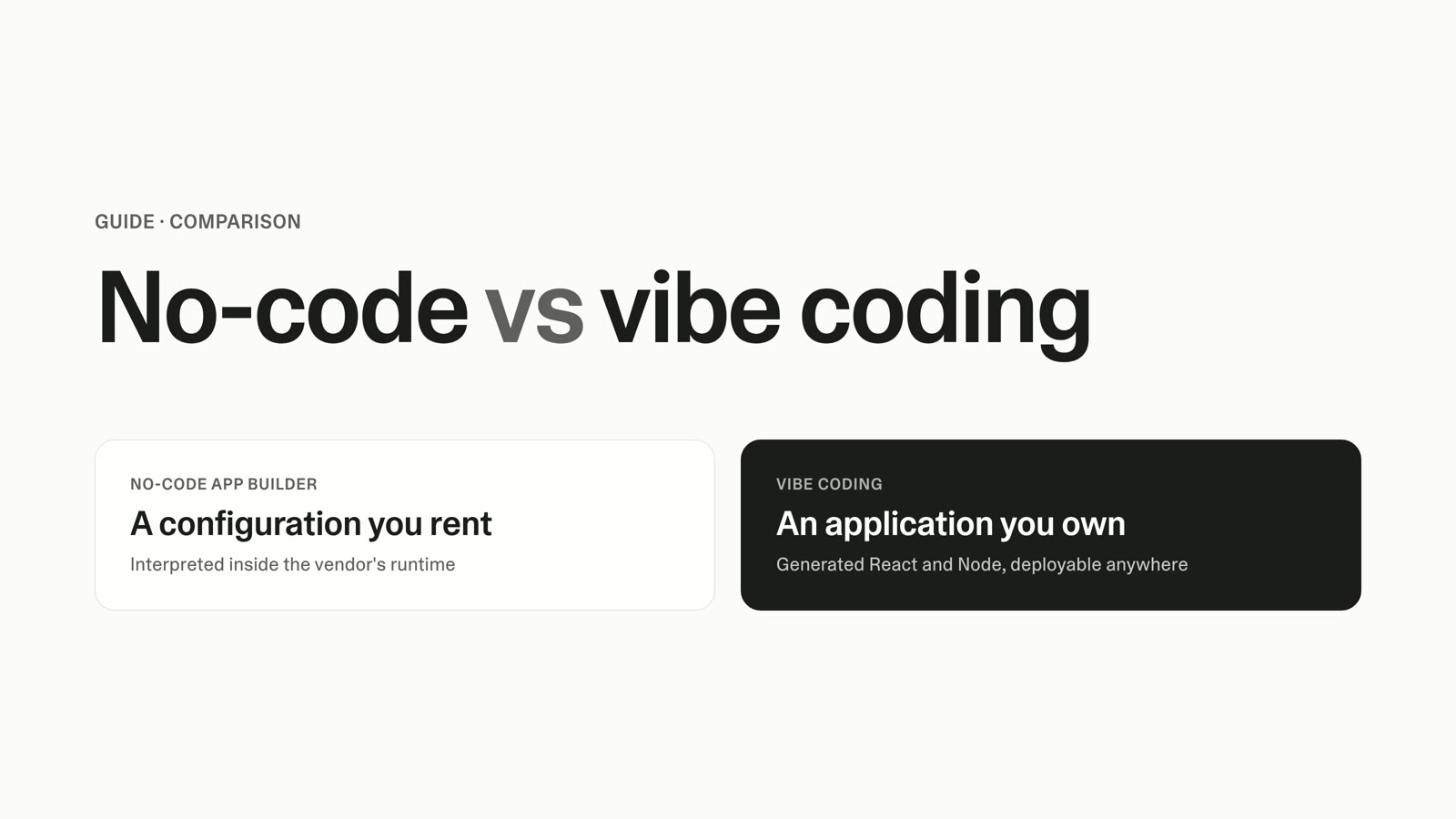
- A no-code app builder assembles pre-built components inside the vendor's system. Vibe coding takes a plain-language description and generates an application.
- The real difference is not visual editor versus chat box. It is whether you end up holding a configuration that runs inside someone else's interpreter or a codebase you own.
- No-code is faster to a standard app and slower to a specific one. Customization is where the ceiling lives: more than 40% of low-code developer questions are about it.
- AI-generated code has a measurable security problem. The studies that found it measured ungoverned generation with no review layer. None of them measured an app built on a platform that ships managed sign-in and database-level access rules.
- Pricing pages hide two costs: usage that scales with traffic rather than headcount, and the multiplication when a second team wants their own app.
- The switching cost is the line item nobody prices in, and published 2026 estimates put it at roughly 2x higher leaving a drag-and-drop platform than leaving a generated codebase.
You have a working prototype on a no-code app builder. It took a weekend, it does most of what you need, and your team is already using it.
Then someone asks for the one thing the business depends on: a pricing rule with three conditions, a permission model where regional managers see only their own region, an integration with the system your finance team lives in. You go looking for the setting, and the setting does not exist.
That is the decision point, and it arrives at scale. No-code app builders have been mainstream long enough that the teams who adopted them are finding the edges at roughly the same moment.
The question is not which category is better. It is which one fits the thing you are building, and what it costs you if you guess wrong.
What Separates No-Code from Vibe Coding
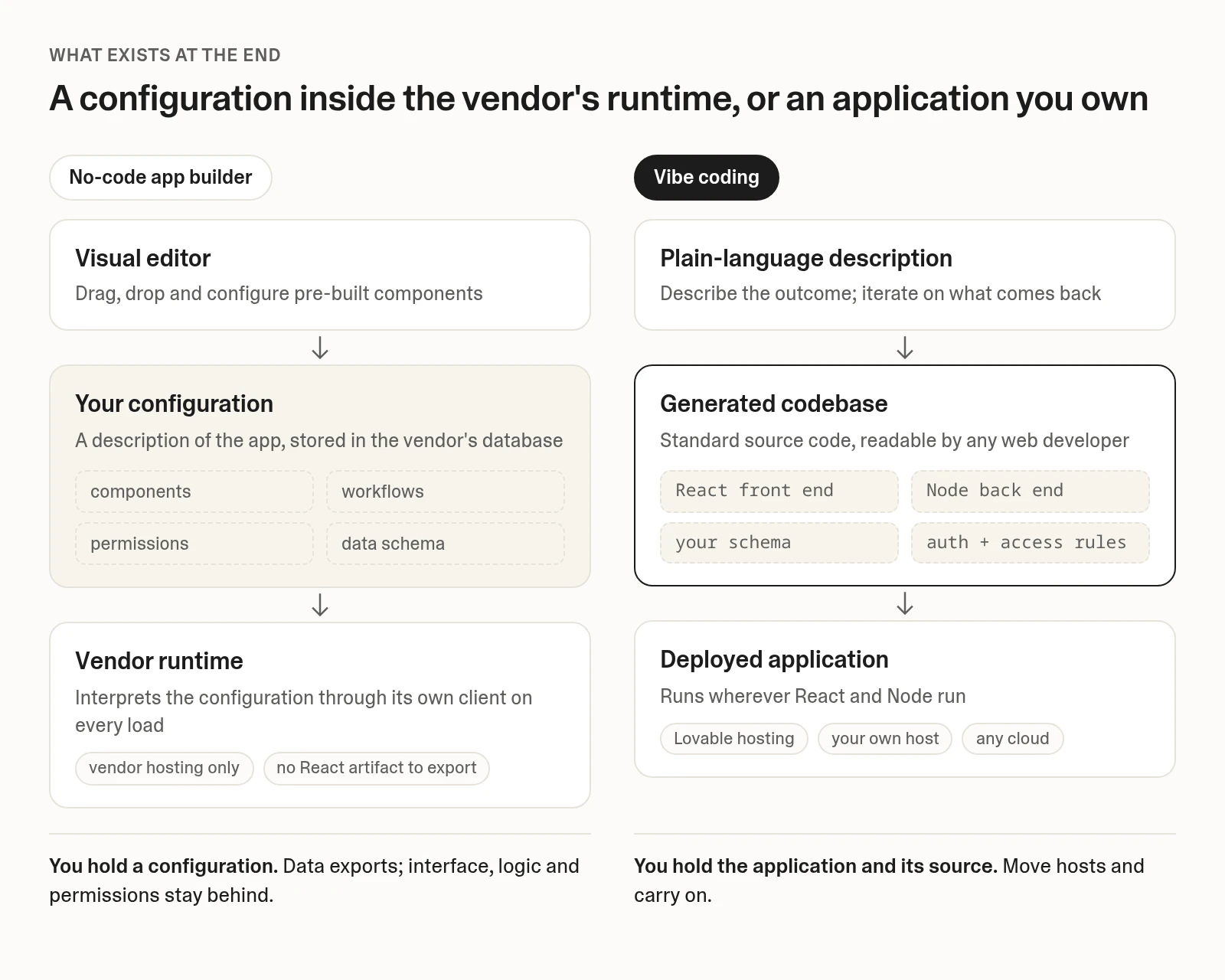
A no-code app builder gives you a configuration. You assemble pre-built components inside the vendor's environment, and their runtime interprets that configuration every time someone loads your app. Vibe coding gives you a generated application: you describe the outcome in plain language and get back a real codebase, deployed and yours.
Framed as build with AI vs drag and drop, the choice looks like a matter of interface preference. It is not. Your customization ceiling, your pricing curve, how you get unstuck, and what it costs to leave all follow from whether an application exists at the end.
The term itself is recent. Andrej Karpathy coined "vibe coding" in February 2025, and Collins named it Word of the Year that November. If you want the full definition, we have a whole piece on what vibe coding is. For this decision, two sentences are enough.
Where No-Code Genuinely Wins, and Where Vibe Coding Pulls Ahead
No-code wins on standard shapes, and it wins convincingly. A members' directory over a spreadsheet you already maintain, a marketing site on a no-code website builder, a form-and-list internal tool, a booking flow: these are solved problems with pre-tested components behind them. The infrastructure is managed, the components have already met thousands of other customers' edge cases, and fewer things break on a Tuesday for reasons nobody can explain.
Add one more condition and the case gets stronger. If exactly one non-technical person owns the tool, has no interest in acquiring code literacy, and needs it to keep working while they are on holiday, a drag-and-drop platform is the responsible choice. Boring and maintained is a feature.
Vibe coding wins when the app is the differentiator. Custom logic no template anticipated, a data model that does not fit anyone's schema, an integration the platform does not offer, or a product you expect to still own and be changing in three years. Vibe coding for non-technical teams is not a compromise position here; it is the route that does not require you to negotiate with someone else's feature roadmap.
The tell is usually specificity. If you can describe your app as a category, no-code probably has it. If you can only describe it by explaining your business, you are building something specific, and the range of things people ship this way is wider than most no-code content admits.
No-Code vs Vibe Coding: The Capability Comparison
This is the AI app builder vs no-code tool comparison on the dimensions that change the decision, rather than the ones that flatter either side.
| Dimension | No-code app builder | Vibe coding |
|---|---|---|
| How you build | Drag, drop, and configure components in a visual editor | Describe the outcome in plain language; code gets generated |
| What you own at the end | A configuration stored in the vendor's database | A deployed application and its source code |
| Customization ceiling | Whatever the platform exposes as a setting or plugin | Anything expressible in standard web code |
| Data model | Platform's schema conventions, usually adequate, occasionally immovable | Your schema, changeable at any point |
| Integrations | Official connectors plus a plugin marketplace | Any API with documentation |
| Who can maintain it | Anyone trained on that specific platform | Anyone who can read React and Node, plus you, by prompting |
| Getting unstuck | Vendor support, forums, and the platform roadmap | Standard web debugging, plus any developer you hire |
| Security posture | Vendor-managed and consistent across customers | Depends entirely on whether the platform governs the output |
| Portability | Usually no code to export, and where an export exists, CMS content, user accounts, and ecommerce data stay behind | Standard React and Node, moveable to any host |
| Time to first working version | Hours for a standard shape | Minutes to hours |
| Time to the specific version | Weeks, or never, if the platform lacks the primitive | Hours to days |
Two rows deserve unpacking.
Portability is architectural, not a policy choice. Visual builders are not withholding a codebase they possess; they store a description of your app and interpret it at runtime through their own client, so there is no React artifact to hand over. One platform's documentation says there is "no way of exporting your application as code", comparing the arrangement to Microsoft owning Word while you own your documents. A staff answer in another platform's community forum is blunter: "there is no source code for your apps".
Even where code export exists, it is not the same as portability. One website platform's export documentation confirms that the export excludes CMS content, user accounts, and ecommerce data, that site search and forms stop working, and that password-protected pages lose their protection. Your data almost always exports, and data is the cheap part. Interface, logic, workflows, and permissions are the expensive part, and those stay behind.
The ceiling is measurable. A 2021 peer-reviewed study of roughly 5,000 Stack Overflow posts across nine low-code platforms found that more than 40% of all questions are about customization. The most popular topic, dynamic event handling, is also the most difficult: 75.9% of those questions never received an accepted answer. That is not a marketing claim about limits, it is the dominant pattern in how people struggle with these tools.
The Security Evidence on AI-Generated Code, Straight
AI-generated code has a documented security problem, so here are the numbers before the argument.
Veracode's 2025 GenAI Code Security Report found that 45% of code samples failed security tests and introduced OWASP Top 10 vulnerabilities, across more than 100 models and four languages. Its spring 2026 update put the security pass rate at roughly 55% and flat since 2025, even as syntax correctness passed 95%.
Separately, a 2026 Cloud Security Alliance research note reporting a 2025 scan by the security firm Escape.tech found that of 1,400+ vibe-coded production applications, 65% had security issues and 58% contained at least one critical vulnerability, including 400+ exposed secrets.
The qualifier matters, in Veracode's own words: those results describe model output "when no security guidance is explicitly provided." The studies measured raw generation on isolated tasks and publicly reachable deployments with no review layer. Neither measured an application that uses managed authentication and database-level access rules, or one that someone reviewed before it went live.
That distinction is the whole argument. Ungoverned prompt-to-production is a real practice with real measured risk, and it is not the same thing as building on a governed platform. Hold those apart and the evidence is usable rather than paralyzing.
Developers are skeptical too, and fairly. The 2025 Stack Overflow survey found 84% use or plan to use AI tools, while 46% distrust output accuracy against 33% who trust it, with "almost right, but not quite" the top frustration at 66%.
The survey sampled professional developers working in codebases they already know. If that is not you, the relevant comparison is not AI versus a senior engineer; it is AI versus a spreadsheet, a backlog, or an agency quote you already flinched at.
What a No-Code App Builder Costs, and What the Pricing Page Leaves Out
List prices are the smallest part of this. Here is where the category stood in September 2026, taken from each vendor's public pricing page, with billing basis stated because several of these platforms repriced during the year. Prices change often, so check the vendor's page before you commit.
| Platform | Free | Entry paid | Mid | Top self-serve | Usage and seat mechanics |
|---|---|---|---|---|---|
| Bubble | Yes | Starter $59/mo annual ($29/mo web-only) | Growth $209/mo annual | Team $549/mo annual | Workload units: 175K / 250K / 500K. Overage $0.30 per 1,000 |
| Webflow | Free Starter workspace | Basic site $15/mo yearly | Premium site $25/mo yearly | Enterprise custom | Site plans and Workspace plans bill separately. Workspace Core $19/mo, Growth $49/mo. Extra seats $39/mo |
| Glide | Yes, limited credits | Basic $25/mo, 100 credits | Plus $50/mo, 250 credits | Pro $125/mo, from 500 credits | Credit-based; Pro adds 50 credits per team member |
| Softr | Yes, 5 users | Basic $19/mo annual | Pro $99/mo annual | Business $329/mo annual | Extra team users $3–$5/mo, client users $1–$2/mo |
| Adalo | Yes, 0 published apps | Starter $36/mo annual | Professional $52/mo annual | Team $160/mo annual | Published-app caps of 1 / 2 / 5. No usage metering |
| Airtable | Yes | Team $20/user/mo annual | Business $45/user/mo annual | Enterprise Scale custom | Strictly per-seat, per user with edit permission |
Two mechanics on that table cost more than the headline number.
Usage pricing scales with success, not headcount. Workload units meter server resource consumption, so your bill tracks traffic and automation runs. A campaign that works, a webhook that fires more often, or a scheduled job you added last month all push you toward overage at $0.30 per 1,000 units. Your app gets more expensive because it is working, without a single new team member.
Two-axis billing stacks. One major website platform bills site plans and workspace plans as independent charges. Three sites on the mid tier is $75 per month in site plans alone, before any workspace fee or the $39 per full seat on top, per a 2026 pricing analysis. A reader budgeting from a single advertised price will underestimate by a wide margin.
Run the math on your own numbers. A three-person team on a mid-tier app platform, plus a site plan, plus seats, lands somewhere around $300–$700 per month before overages, so $3,600–$8,400 a year. Hold that against the one-time cost of leaving, which we will price in a moment, and the picture changes. This buy-versus-build calculation plays out the same way in product roadmap tooling: the subscription is rarely the expensive decision.
When to Choose a No-Code App Builder, and When to Vibe Code It
Four tests. You can run all of them in 30 seconds.
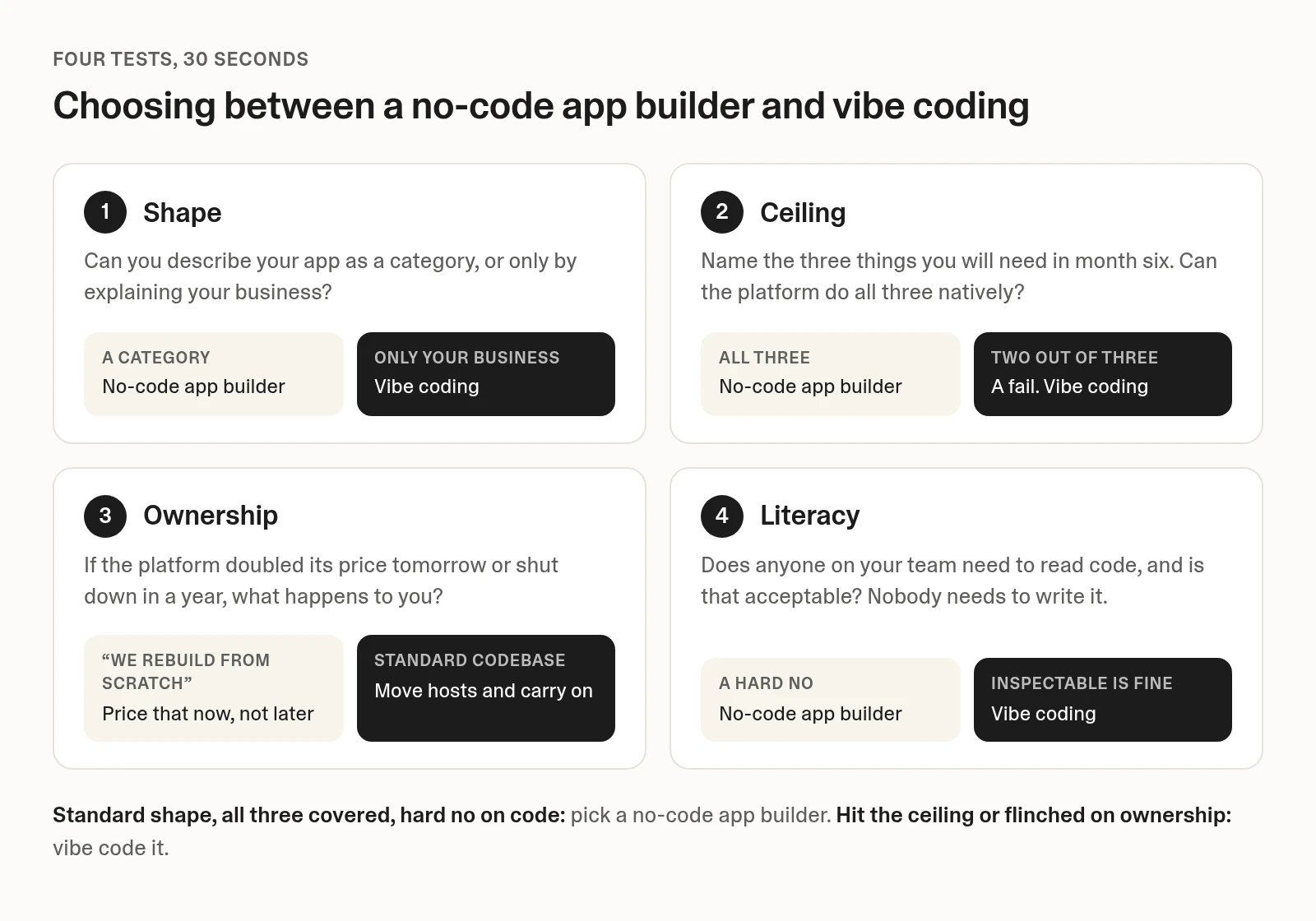
- The shape test. Can you describe your app as a category, or only by explaining your business? "A booking form for a salon" is a shape. "A booking form that blocks double-booking across two locations, applies member pricing tiers, and pushes to our dispatch system" is not a shape. Standard shape: no-code. Specific shape: vibe coding.
- The ceiling test. Name the three things you will need in month six. Not today's feature list, month six. Check whether the platform can do all three, natively, without a plugin you are hoping stays maintained. Two out of three is a fail, because the one you cannot build is always the one the business depends on.
- The ownership test. If the platform doubled its price tomorrow or shut down in a year, what happens to you? If the honest answer is "we rebuild from scratch," price that now, not later. If you hold a standard codebase, the answer is "we move hosts and carry on."
- The literacy test. Does anyone on your team need to read code, and is that acceptable? Nobody needs to write it either way. But a generated app is inspectable, and someone eventually looking at a file is a different proposition than nobody ever being able to.
If you scored standard shape, all three month-six features covered, and a hard no on code literacy, choose a no-code app builder. That is a real verdict, not a rhetorical one. Go pick a good one from our comparison of no-code website and app builders and stop reading. You will ship faster and break less.
If you hit the ceiling on test two or flinched on test three, you need a no-code alternative for custom apps. The AI builder category is where that lives, and the rest of this article is about what it looks like in practice.
Lovable in Practice: What Vibe Coding Looks Like When It Works
Here is what vibe coding without a developer looks like on a real build. A finance operations lead who has never written code opens Lovable and describes the tool in one sentence: an internal app where regional managers submit capital expense requests, finance reviews them in a queue, and anything over $10,000 routes automatically to the CFO before it can be approved.
What comes back from that first prompt is a working app they can click through straight away: a submission form, a reviewer queue, sign-in, a database in Lovable cloud holding every request with its full approval history, and the $10,000 threshold wired into the routing logic. That last part is the piece no template covered, and it took one sentence.
The next prompts are the ordinary ones. Scope each manager to their own region, add the two fields finance wants, fix the thing that reads wrong. Region-level access is a rule on the data rather than a checkbox in an interface, so sign in as a second manager and confirm they cannot see the first one's requests. Publishing takes two clicks, and the app goes live at a URL they can send to the team.
Ask for a plain-English summary of the month's spending and the Lovable AI gateway handles it inside the same build, with no external provider account to configure. No model choice, no billing relationship, no key to paste anywhere.
That is the answer to the security evidence from earlier: the governance those studies found missing. Managed sign-in instead of hand-rolled auth, and access rules enforced at the database row rather than in the browser.
None of that makes a generated app immune, and you still review what you ship. It does make it a different variable from prompting a model and deploying the output unread.
The scale says this is not a trend to watch. Lovable has 60 million projects built, 100,000+ new projects every day, and 200 million+ monthly visits to applications built with it. At one enterprise, 24 apps are in production with 77 more in progress, and the company is retiring $1 million in SaaS contracts.
The comparison that lands, though, is against the quote they were dreading. Laura Stevenson, SVP marketing at AppDirect, put it this way: "We could have paid an external company $80,000, and it would have taken six months. With Lovable, it took less than one month."
Switching Between Them: What Migration Costs
This is the largest number in the decision and it never appears on a pricing page.
Leaving a no-code platform means rebuilding, not moving. Data migrates through CSV or API, and user accounts and third-party integrations usually carry over. You rebuild everything else: backend workflows, plugins, privacy rules, and the whole interface.
Published 2026 agency estimates put a simple internal tool or dashboard at $8,000–$15,000 over four to six weeks, mid-complexity SaaS at $18,000–$35,000 over 8–12 weeks, and complex multi-tenant products at $35,000–$60,000. Those come from firms that sell migrations rather than neutral research, though the direction is consistent. The same source notes 2026 pricing runs 40–50% below 2023 comparables, because AI-assisted development reset the cost curve.
Leaving a generated codebase costs roughly half as much. A Polish software house's published 2026 price list quotes about £2,000 and two weeks to rebuild a simple app off a leading drag-and-drop platform, rising to £5,000–£9,000 for a standard SaaS. Moving a generated React app to a self-hosted React and Node stack runs £1,000 simple and £3,000–£6,000 standard. The reason they give is structural: on the drag-and-drop platform the front end is not portable, so you rebuild both layers, whereas with generated code the front end comes with you.
Authentication breaks first, in both directions. The same price list ranks the failure points: auth, then webhooks and integrations, then deep links and SEO, then file uploads and transactional email. Expect a 10–20% re-login drop-off in week one. One client on that list lost 40% of organic traffic in month one for want of 301 redirects.
There is a middle path, and it is often the right one. Keep the no-code tool where it earns its keep, and build the piece it cannot do as a separate application. Your marketing site does not need to move because your approvals workflow outgrew a plugin. Migration is a decision you make per system, not per company, and vibe coding makes that granularity affordable in a way a $35,000 rebuild quote never did.
FAQ: No-Code vs Vibe Coding
Is Vibe Coding the Same as No-Code?
No. Both let you build without writing code, but no-code configures pre-built components inside a vendor's runtime, while vibe coding generates a codebase from your description. The end artifacts are different: a configuration you rent versus an application you own. That difference sets your customization ceiling and your switching cost.
Do You Need to Know How to Code to Vibe Code?
No. You describe what you want in plain language and iterate on what comes back. Code literacy helps when you want to inspect something specific, but it is not a prerequisite for shipping a working app with a database, sign-in, and custom logic. What you do need is clarity about what the app has to do.
Is No-Code Dead Now That AI Can Write Code?
No, and anyone telling you otherwise is selling something. For a standard shape owned by one non-technical person, managed infrastructure and pre-tested components remain the lower-risk choice. The category has a ceiling, not an expiry date. What has changed is that hitting that ceiling no longer means hiring engineers.
Is Vibe Coding Safe for a Production App with Real Users?
It depends entirely on governance. Veracode's 2026 data shows roughly 55% of AI-generated code passes security tests when no security guidance is given, which is the ungoverned case. Building on a platform that supplies managed sign-in and database-level access rules is a materially different risk profile from prompting a model and deploying the output. Either way, still review what you ship.
Can I Move My App off a No-Code Platform Later?
Your data, yes, through CSV or API export. Your application, mostly not. Major platforms document that there is no source code to export, and where code export exists it typically excludes CMS content, user accounts, and ecommerce data. Plan on rebuilding the interface, workflows, and permissions, at published 2026 estimates of $8,000–$60,000 depending on complexity.
Which Is Cheaper, a No-Code App Builder or Building with AI?
Over 12 months, subscription costs are comparable and both are small. The difference shows up at the edges: usage-metered plans get more expensive as your app succeeds, and published 2026 estimates put the exit cost at roughly twice as high leaving a drag-and-drop platform as leaving a generated codebase. Price the exit before you price the subscription.
Try It on the One Feature Your Platform Will Not Build
If you ran the four tests and landed on "specific shape, already hit the ceiling, not hiring engineers," the next move is small. Describe the one feature your current platform will not build, in a sentence, and see what comes back. You will find out quickly whether the thing you have been told is impossible takes an afternoon.