lovable.dev is a pretty busy website: we have 42M+ monthly unique visitors. It's also pretty complex: close to 400 routes, 910K+ lines of non-generated code, supports over 150 agent tools, and even has a small IDE with syntax highlighting inside. It's now hosted on Lovable, the same way as any other Lovable app.
Why we did it
Before we migrated, lovable.dev was a Next.js app hosted on Vercel. (We originally hosted it elsewhere, but started to hit issues as we scaled, like build compatibility between local & prod or poor loading times in certain geographies.) Vercel performed admirably, and our issues went away as soon as we moved to it. That said, we decided to migrate our hosting to Lovable for several reasons.
The main reason to use our own product is dogfooding. We want to feel our users' pain and we want to have the shortest possible feedback loop to keep making our product better for users.
We also want to push the frontier of single-app scaling. We were already good at hosting tens of millions of apps, where the median app is small and low-traffic. Supporting tens of millions of visitors for a single app is a different problem with its own unique challenges. Every improvement we make for ourselves automatically benefits every builder who runs their app on Lovable.
And finally, we wanted to pass any internal knowledge on making the best web apps back to our builder agent—and make every user see the benefits for their apps. With a unified tech stack it's easier than ever.
Background on how we host apps
Today Lovable builds and hosts primarily TanStack Start apps. The framework fits our needs for isomorphic execution, simplicity of deployment and type safety particularly well; see our post “Building apps using TanStack Start” for more background on reasoning and how we use the framework. Each published Lovable app is built as its own worker for Cloudflare's workerd runtime. Then a single entry worker serves every app by loading the code, creating a worker dynamically and dispatching a request to it.
Every dynamic worker lives in its own V8 isolate sandbox. An isolate is a private V8 heap that lives inside a controlling process—a cheaper alternative to using a separate process. Think containers vs. virtual machines. Isolate instantiation cost is proportional to the worker bundle size and could be 4ms at the cheap end up to 1s for a huge bundle. Isolates are cached and reused, so that loading and instantiation overhead is amortized across many requests. This is the part that makes running millions of apps economical. Isolates are typically evicted on an LRU basis or when they get over the memory limit. Eviction is not always graceful—we'll get to that later.
We migrated lovable.dev to TanStack Start to serve it the same way—now it's just one of the possible destinations among 60M+ of our users' apps. There are fewer than 200 lines of code unique to the lovable.dev serving path (mainly handling a different release metadata format and a different observability setup).
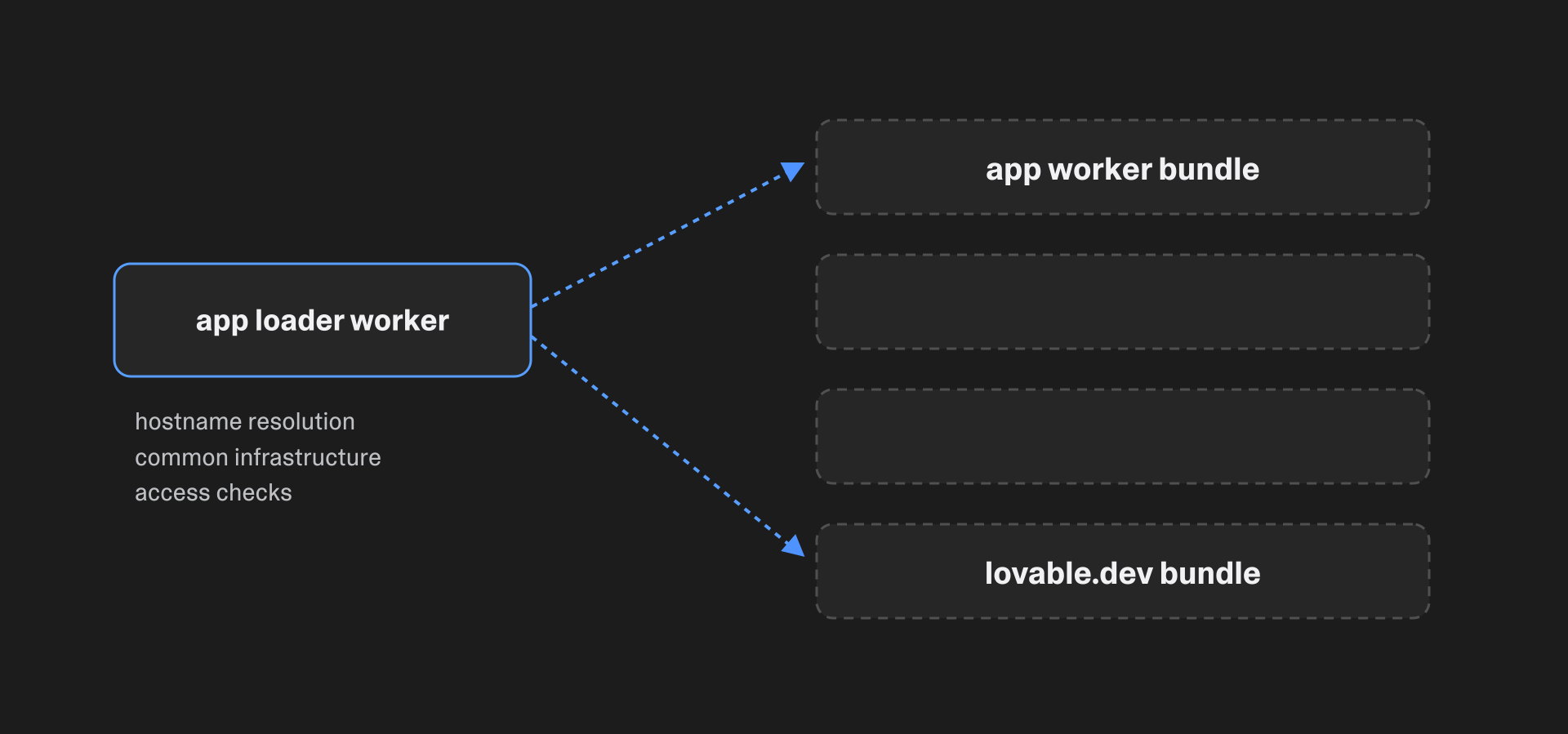
lovable.dev is served by the same app loader worker as every other Lovable app—it is just one more bundle among 60M+.
Migration strategy
Migrating a rapidly-developed app is a kind of race where the finish line is running away from you. I started it as a lone developer looking at 350K lines of code. By the time the migration was complete, six months later, the app had grown to over 850K lines (and we've already added 60K on top since then). People here just never stop shipping new things.
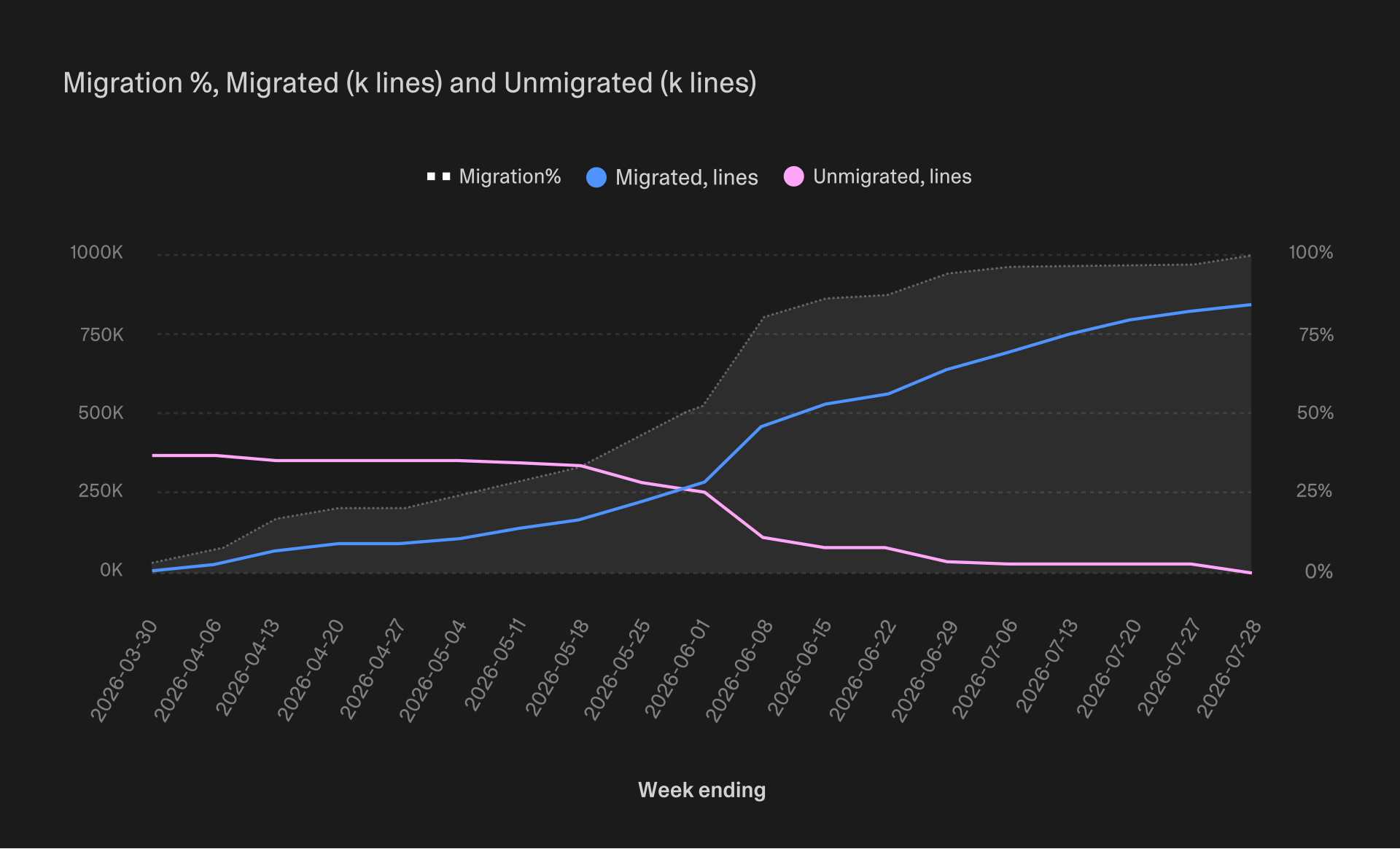
Migration progress, week by week. The total kept growing under us the entire time.
The overall plan was shaped by one of my big professional regrets from before Lovable: working on a big-bang migration in parallel with the old system that was still running and switching after achieving feature parity. This time I chose a different approach: we'd rewrite it gradually while keeping everything working on both frameworks. In retrospect this proved to be the most important single choice made in the migration.
Running two frameworks in parallel
We needed to run both frameworks in parallel and dispatch requests to the right one. This way the migration would happen route by route rather than all at once.
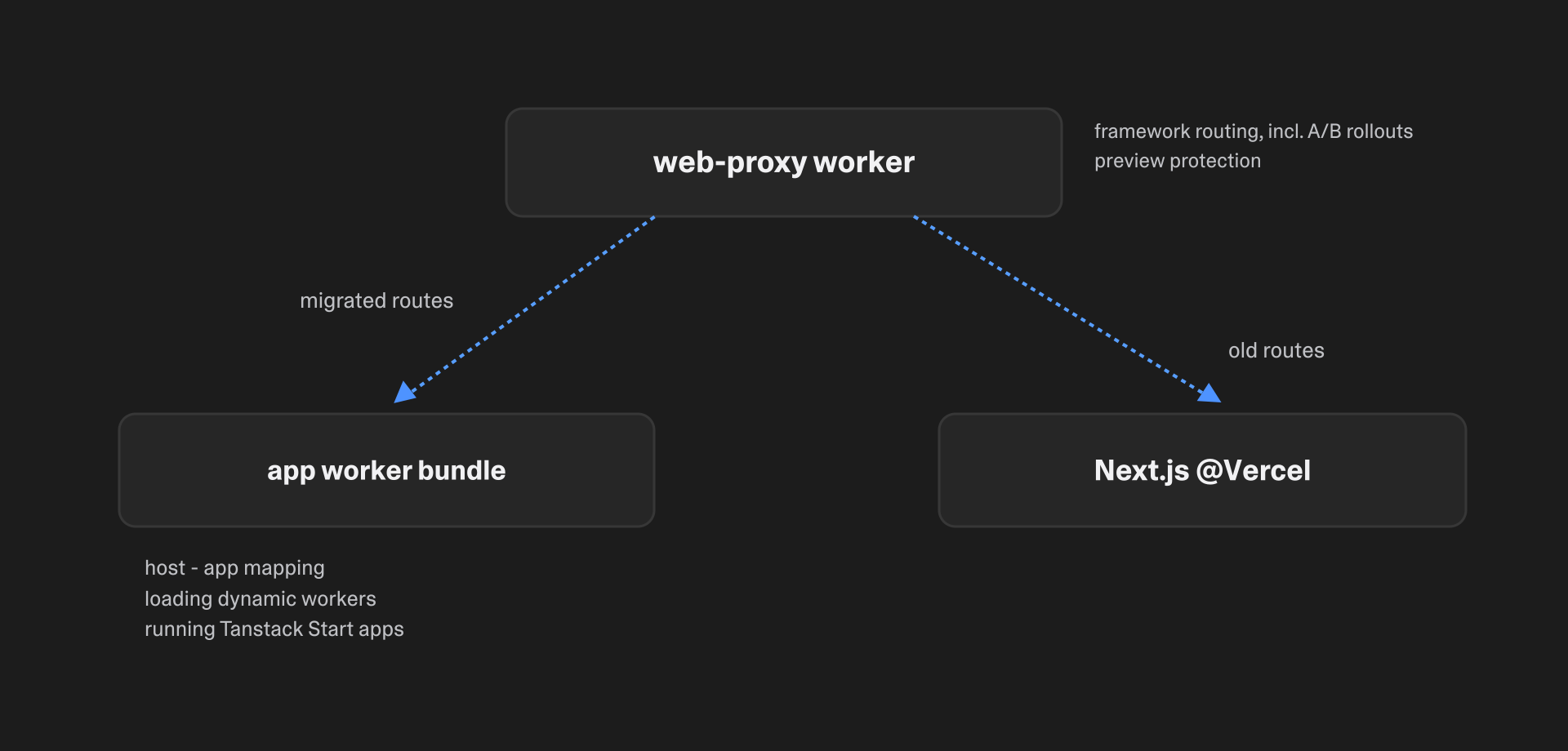
A proxy worker in front of both frameworks decides, per route and per user, which one serves the request.
One important aspect of this setup is user experience. Crossing the line between frameworks means hard navigation—the user's browser needs to load a new document and a new set of resources. Compared to that, internal (soft) navigation only loads some scripts and the data for the new route, reusing everything else. In practice hard navigation is much slower (~5s vs. ~1.5s median for live users before the migration), so we needed to keep it as infrequent as possible.
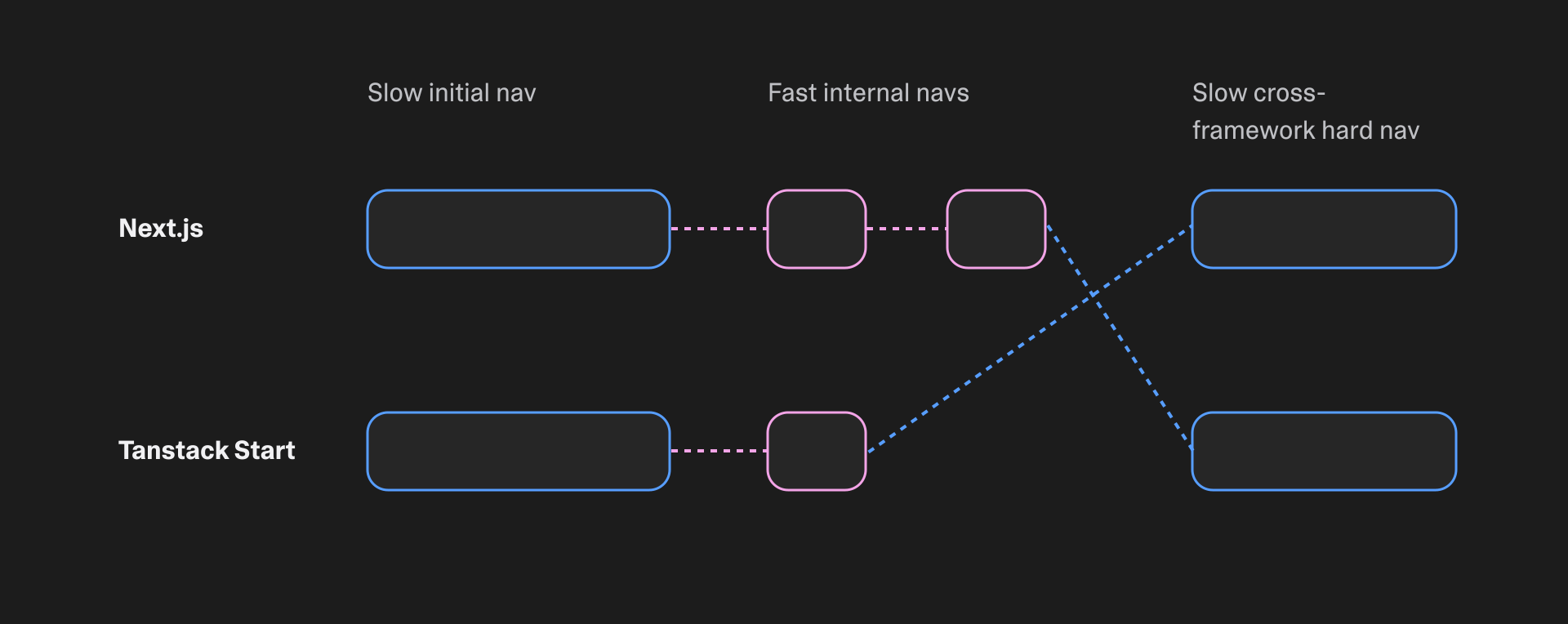
Navigations within a framework are cheap. Crossing between frameworks costs a full document load.
To achieve this I mapped all our routes onto typical user journeys and created migration groups: routes users moved between frequently were migrated together. I ended up with five major groups and a few minor ones. Each group's rollout was controlled by a feature flag to make the switch within a group gradual—during rollout a certain configurable % of visitors would be randomly assigned one framework or another.
Smoothing hard navigations
One neat trick for making the visual experience of hard navigations better is the browser's cross-document View Transitions API: a single CSS at-rule that applies a smooth cross-fade transition, replacing the default white flash.
@view-transition { navigation: auto; }
The transition only fires when both the outgoing and incoming page carry the rule. After we added it, my colleagues stopped noticing hard navigations other than by their longer duration.
Framework stickiness
One interesting problem we solved along the way was keeping each user on whichever app they first landed on. If user A gets the Next.js version of the project settings they should stay on Next.js for all routes in the settings group. Same for user B who landed on the TanStack Start version—they should stay on their framework within a group. To solve this we extracted the route registry along with feature flag metadata and used it as a single source of truth for our proxy and both frameworks. Every framework understood, through wrapped router components, which routes should use soft vs. hard navigation.
Deterministic feature flags
How do you test end-to-end when you have randomized feature flags? I built a way to override framework selection deterministically so that tests could cover both frameworks reliably and verify they both work as expected. The proxy server sees internal search parameters and assigns the feature flag(s) specified in them instead of a random value. This is a generally useful capability for any system with feature flags—you want your tests to be deterministic and not affected by the current randomized rollouts.
Sharing the code
The next goal was creating a way to share the code between Next.js and TanStack Start. The target state was 5–10% framework-specific code and 90–95% of code being framework-agnostic and shared between both. In the end we got there—right before its removal, Next.js specific code was 3% of our web codebase.
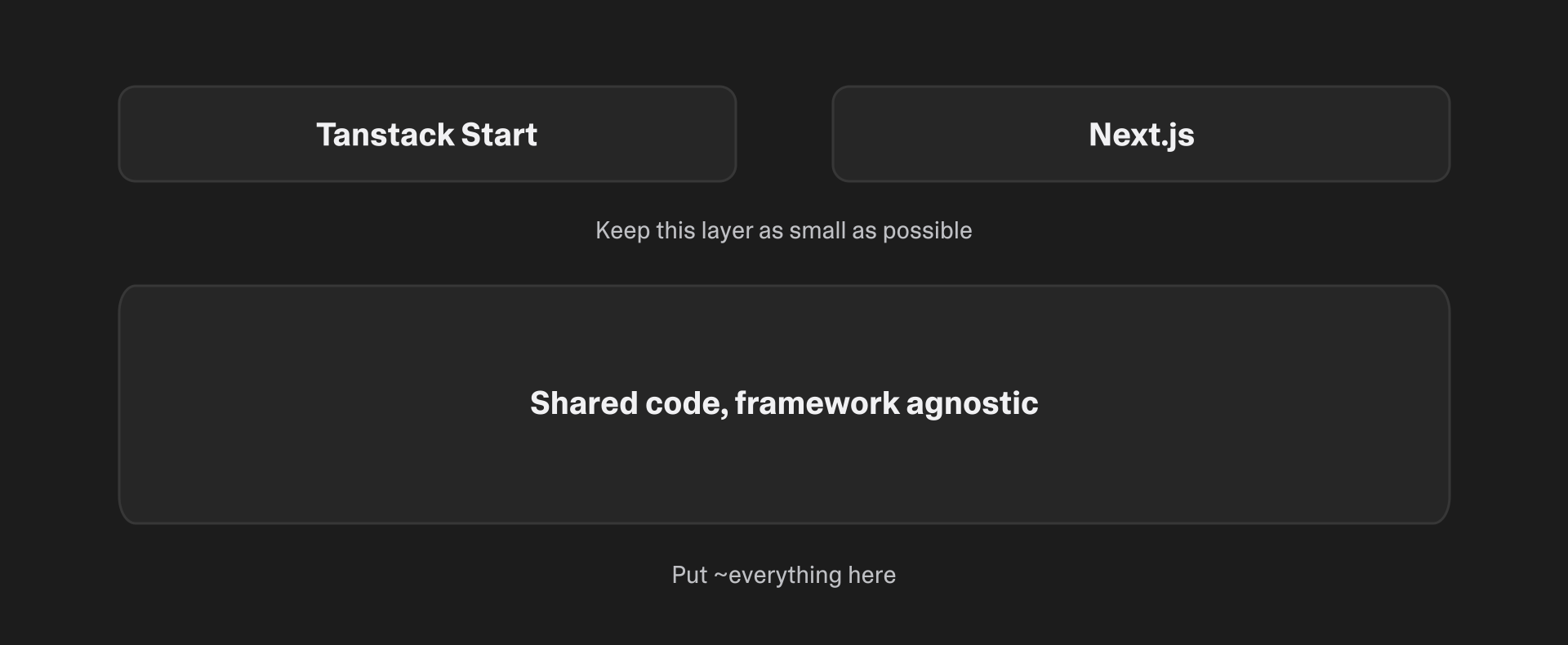
The target shape: a thin framework layer over a large framework-agnostic core.
I selected a dedicated root folder for shared code and wired the #shared/ alias into both frameworks' module resolution (package.json imports, mirrored in tsconfig.json paths for the typechecker). I added lint rules to verify that shared code never imports either framework.
// web/package.json (TanStack Start)
"imports": { "#shared/*": "./shared/*" }

// app/package.json (Next.js)
"imports": { "#shared/*": "../web/shared/*" }
// works identically in either framework
import { buildUrlPath } from "#shared/lib/routes";
// oxlint.config.ts—shared code stays framework-agnostic, enforced
{
  files: ["web/shared/**/*.{ts,tsx}"],
  rules: {
    "no-restricted-imports": ["error", {
      paths: [
        { name: "next", message: "Shared code cannot depend on Next.js." },
        { name: "@tanstack/react-start", message: "Shared code cannot depend on TanStack Start." },
        { name: "@tanstack/react-router", message: "Shared code cannot depend on TanStack Router." },
      ],
      patterns: [
        { group: ["next/*"], message: "Shared code cannot depend on Next.js." },
        { group: ["node:*"], message: "Shared code cannot use Node.js APIs. Must be runtime-agnostic." },
      ],
    }],
  },
}
Describing this whole setup in AGENTS.md and iterating a few times got us to a state where any new feature was written in a portable way by default.
Preventing regressions
At some point in the middle of the migration I added another check: no new feature code outside of #shared. “Feature code” is a fuzzy concept, but using agentic automation instead of a deterministic check made it verifiable. This helped by both preventing new non-portable code from appearing and also by educating developers who were for any reason not aware of the ongoing migration. Here's an example of such a check finding that a PR is compliant:
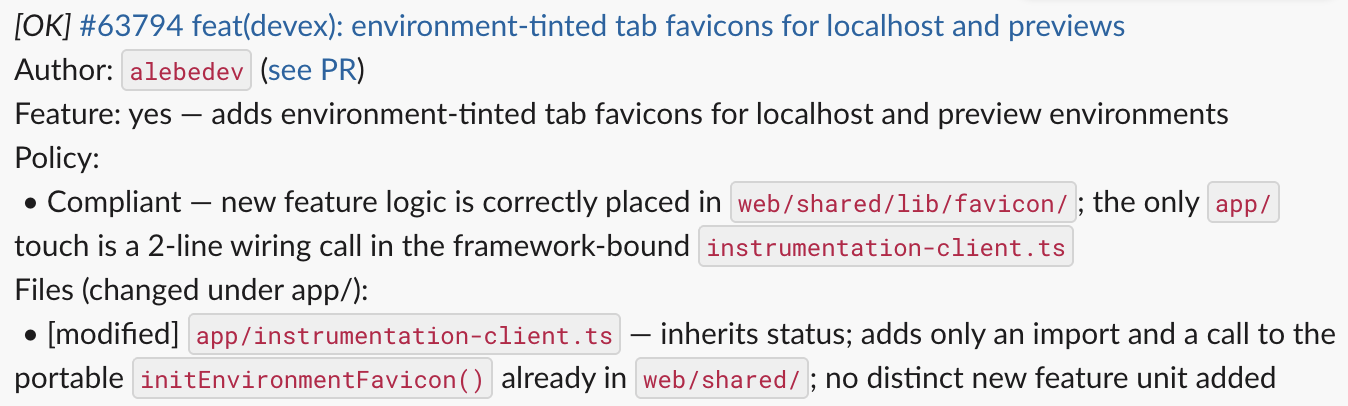
The portability check explains its verdict per file, so authors learn the rule at the moment it matters.
Adapters and compatibility layer
Once you have shared code, how do you handle the situation when some deeply nested component needs to import next/link to show a navigation button? I'd rather not keep each such component in the framework-specific part of the code. I briefly considered doing some dependency injection via a top-level Provider, but that meant replacing imports with reading from a context—a big change that can also have runtime overhead if you're not careful.
What I ended up implementing is a sort of interface-based dependency injection. Shared code declares a common denominator interface, and each framework implements it. Then, thanks to TypeScript import aliases, you just import the thing you need instead of interacting with the dependency injection mechanism explicitly.
// app/tsconfig.json:  "@platform/router": ["./lib/router/next-adapter.ts"]
// web/tsconfig.json:  "@platform/router": ["./lib/router/tanstack-adapter.ts"]

// next-adapter.ts
export { usePathname } from "next/navigation";

// tanstack-adapter.ts
export function usePathname(): string {
  return useLocation({ select: (loc) => loc.pathname });
}

// shared code, works under either framework
import { usePathname } from "@platform/router";
Platform adapters were the last missing piece to unlock moving 90+% of the code to the shared section.
Trimming to the core
One way to keep the framework-dependent part small is to use fewer framework APIs in the first place. They would need to be replaced with something else in the end anyway—so why not start early and swap some framework-specific APIs with something framework-independent? For us that was next/font and next/image, plus our authentication and i18n solutions, each of which was built on a third-party library that relied on Next.js.
Doing those early migrations while still running Next.js reduced overall risk and gave us some quick wins. For example, the new in-house auth library improved stability and brought a 10x+ reduction in the number of Firebase Auth calls. And a new i18n solution improved both runtime performance (~3x lower CPU cost of i18n initialization at page load) and compile-time safety (a misspelled translation key became a typecheck error).
Now that we depended on a smaller slice of the framework, the migration itself could start.
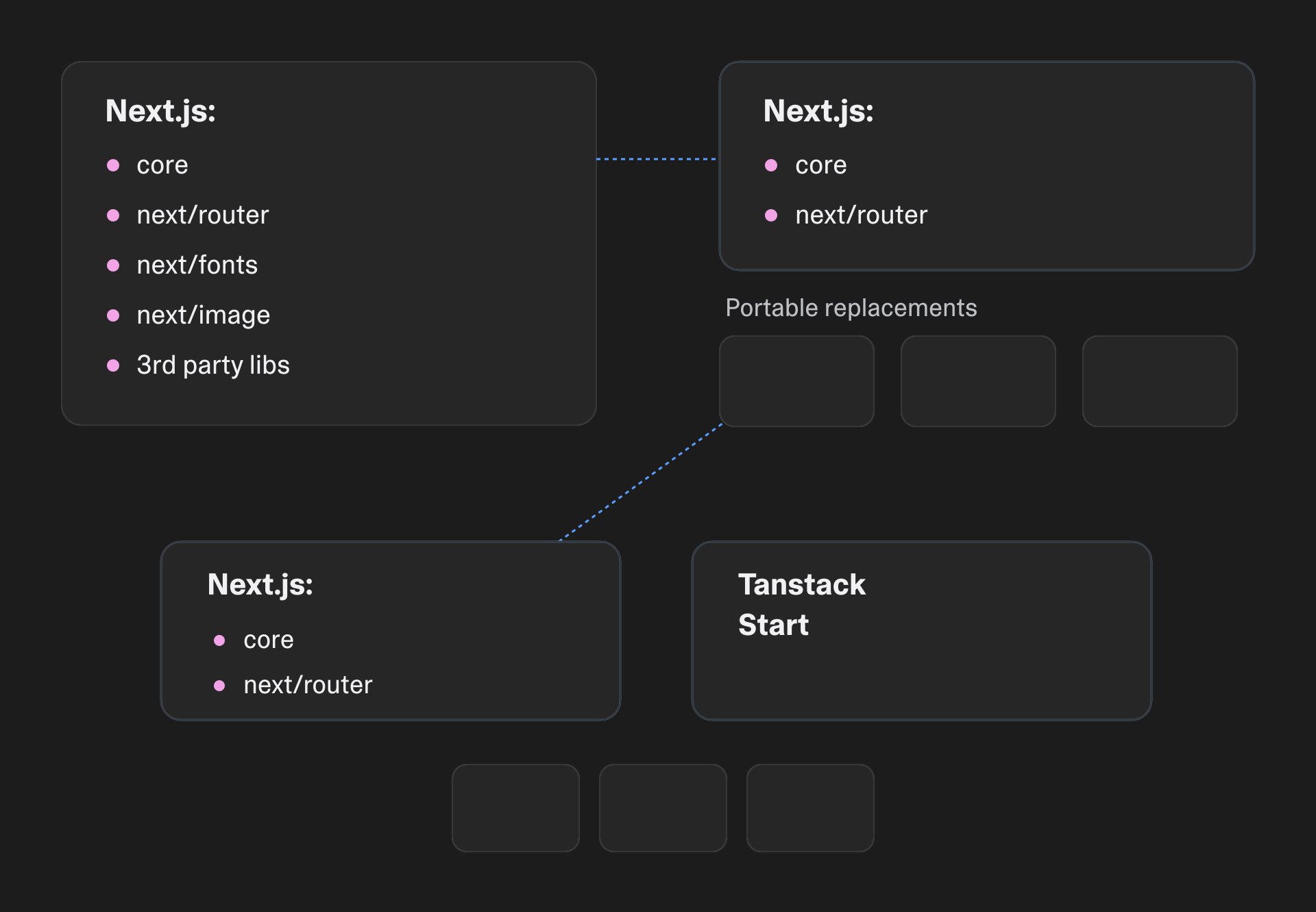
Replacing framework APIs with portable equivalents first shrank the surface the migration had to cross.
AI-assisted code move
When I planned the migration, the original strategy was “let's build all the tools then distribute the bulk of the work across the teams who own and maintain product features”. It didn't survive contact with reality—in a good way. First it became “agents draft the PRs, owners review and test”. Then the drafts turned out to be good enough that I reviewed and landed them myself, batch after batch. In the end, no team ever received their share of the migration.
A few techniques naturally evolved as migration work went forward.
The first was a set of skills and agent knowledge that supported asking “Move component X to shared web code” and getting a production-ready PR back. When you expect to repeat some kind of work tens or hundreds of times, it pays off to extract the common reusable parts of your prompts—the same way you extract reusable code instead of copy-pasting it. This also greatly simplifies the human handoff. The first few times when I said to a colleague “ask your agent to migrate this component—it already knows how” and it actually worked, it felt like magic. You can save so much time on coordinating a big team effort when all you need to communicate to humans is a high-level overview and their agents can fill in required details as needed. In a few months I replaced the underlying web framework while the ever-growing development team was busy doing their work and people barely noticed—this felt amazing!
The second useful improvement was raising the level of abstraction for agentic planning. I started at the bottom of the ladder: low-level goals set and tracked by me, planning and implementation done by the agents. For example, when making sure we can show a project list fully in TanStack Start, I identified 21 React context providers that all needed to be migrated to shared code. Each provider was tracked as its own Linear ticket. Somewhere in the middle of migrating those providers I noticed how few interesting decisions each one actually needed. And all the boring stuff should go to AI as soon as I could figure out a good enough way to delegate it. The delegation ended up looking like a /goal loop applied one level up, to planning rather than implementation:
- Define a measurable migration metric (e.g. “How many agent tools still have a Next.js UI”) and write a script to measure it deterministically.
- Feed that to a planner agent to identify large enough batches of migration work: “identify coherent subset of the migration from the above that can be implemented as a PR stack, 12 PRs max, 800..1600 lines/PR preferred size”. Those batches are then handed off to implementation agents. I wrote more about the overall process in a post about scaling agent coding.
- Keep going until the metric reaches zero or there's a hard roadblock. Identify the next metric to bring you closer to the complete migration and repeat.
A third useful finding was migration-specific review automation that identified non-portable patterns in new code and told authors how things should be refactored instead. Every merged PR was analyzed by the agent to make sure it met compatibility requirements. Small fixes to existing features were exempt to reduce friction. Every new feature or big change that wasn't compatible triggered an alert to the author. The fix, as usual, was “tell your agent to make it compatible, it already knows how”. This way everyone knew just enough about making web code compatible and learned it at the right time. Thanks to this automation, we ended up having unusually few “oops, this has never been ported” surprises at the end of the migration.
So, in the end agents did a good enough job of migrating the code and verifying correctness. Agent-driven exploratory checks, smoke tests I ran myself and the staged rollout gave me enough confidence that I never needed to involve code owners at all. What would've been a multi-team coordination effort two years ago was done by a single developer and a pack of agents. The results of the migration usually passed smoke testing with a few small fix iterations. And things looked good enough to start serving real users with the TanStack Start version of lovable.dev.
Switching the traffic
Traffic was switched one route group at a time. We went through a multi-stage A/B rollout for every route group: limited internal testing → company-wide internal testing → 1% of users and then gradually all the way to 100%. For a big integrated system like ours it's effectively impossible to predict all its behavior analytically, so the main quality controls you have are a good feedback loop, the ability to roll back fast, and the ability to fix things quickly. For the first few route groups, internal testing took up to a week as we found and fixed all the post-migration issues. The duration was similar for external users—we had fewer issues, but we took more time to make sure we got proper signal from a small % rollout before moving further.
Having multiple ongoing rollouts in parallel can be confusing, so I made sure we only had one external rollout climbing from 1% to 100% at a time; the next one waited in the queue even if internal results showed it was ready to start. There was always some parallel work migrating further parts of the system, and therefore no rush to roll out. The last few groups took about a week end-to-end, and were boring in a good sense.
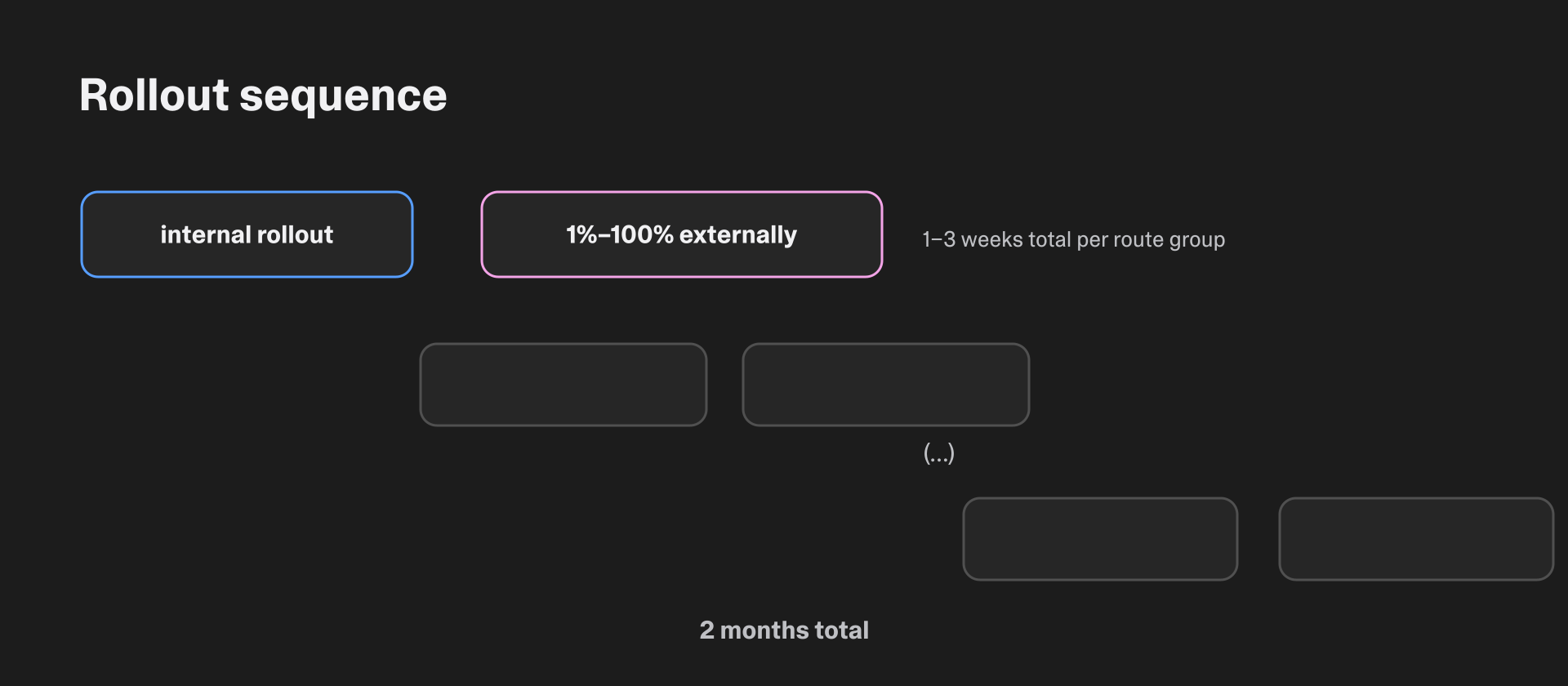
One external rollout climbing at a time, staggered across route groups—two months end to end.
When you're watching rollout logs, the most obvious failure modes are crashes and functional bugs. Less obvious but at least equally important is system performance. We monitored server response time, server error rates and web vitals, and tracked how frameworks compared with each other on each. We managed to identify and fix most of the performance issues before they affected a large share of users. Not all, though—and if I were doing it again I'd spend even more time on monitoring performance and be more aggressive about rolling back changes that look slow in the metrics.
One takeaway on performance optimization: you want to look at both synthetic metrics and the ones from real users. Synthetic metrics are less noisy and easy to integrate into an agentic loop, so optimizations are easier to make. And real user metrics are your ultimate target: they move slowly and are harder to influence directly, but they reflect the real state of the system for the users.
All in all the rollout took about two months, and most of it happened while still migrating code (only the last 2–3 weeks were solely about rollout with no migration work happening anymore). There's definitely a risk-vs-time tradeoff here, and I'm pretty happy with the relatively conservative approach we took on rollout. For the most part. In one case things went wrong spectacularly.
Out-of-memory incident
I had just finished the rollout of the biggest route group—it went smoothly, and I got more optimistic than I should have. The next route group was the dashboard: less code, less risk, but it sat on every authenticated user's journey. Internal rollout was uneventful, and I started slowly increasing the percentage in the public rollout. 1%. 5%. On Friday before lunch I set it to 20%. And in the afternoon complaints about performance started to arrive. And then our error rate went up—gradually, then suddenly. It moved from 0.1% to 0.5% at first. Then it went to around 50% in just a few minutes, and all the alerts we had went off.
The incident lasted 11 minutes. As is often the case, rolling back the commit that broke everything was much faster and easier than understanding why it had happened in the first place. Turns out we were living too close to the edge: in our case, the memory limit of our runtime environment. Migrating some static data JSON for the public website (a completely unrelated feature, hidden behind a flag that was turned off) pushed us over the limit. The few added MB became the last straw. The dashboard rollout increase was not the root cause, it just exposed more people to the problem at the worst possible time.
Why did it break? Remember, V8 isolates are supposed to be reused many, many times—ours were serving fewer than 10 requests on average before being killed for going over the memory limit. For comparison, our current baseline is 500–10K requests per isolate, mostly influenced by deployment frequency. And when an isolate is killed, every request it's currently processing errors out.
What did I do wrong here? Did not measure initial memory use. Ignored early warnings and accepted a 0.1% error rate as something we could figure out later, when the migration was over. In other words, too much optimism and too little looking at the actual data.
Once it was clear exactly what went wrong, the long-term fix looked like applying more AI to the problem. “Here's how to measure memory usage in server requests. Give me 10 ideas on how to reduce it. Prototype and measure. Apply each good one as a PR”. All you need is time, tokens and engineering taste to see which ideas are promising. And lately we're seeing zero out-of-memory errors on a median day.
Some examples of memory improvements that helped us there:
- Don't parse multi-megabyte JSONs with static content at module level—those objects stay in server memory forever. Importing as raw strings and parsing in request handlers cut memory consumption between 2x and 12x depending on specific route.
- Excluding unused fields from list APIs saved us a few MBs on templates—we have hundreds of them and catalog pages never needed full descriptions.
- Replacing client-only code with empty stubs in the server bundle. Some parts of lovable.dev are essentially an IDE in the browser and most of that code wasn't needed server side. Excluding the TypeScript compiler, Prettier, the syntax highlighter and similar components saved us around 9MB in server bundle size, which translated to 18MB of worker memory. Bundle bytes count roughly double in memory: V8 uses a two-byte format for the whole string if it contains even one character outside of Latin-1. The whole bundle is loaded as a single string and our locale data guarantees that string has international characters in it. When your total limit is 128MB things like this start to count.
How TanStack Start compared to Next.js
Some personal reflections after using Next.js for many years and then migrating my largest project ever away from it.
Better local developer experience
TanStack Start uses Vite dev server, which starts faster and consumes several times less RAM compared to Next.js. On our codebase we're talking about the difference between 10s start / 1.5GB RAM on TanStack and 70s start / 8GB RAM for Next.js (numbers from my Macbook M4 Max, no other major workloads during measurement). And I've seen some frustrated colleagues reporting 20GB+ RAM from Next.js—not exactly what you want to see when you're trying to debug some backend service and don't need the local frontend all that much.
You never have enough RAM, even on the latest hardware, so low memory use is a breath of fresh air. And start time matters more when you switch between branches many times per hour.
That was on Next.js v16.2 with Turbopack enabled; the new v16.3 claims up to 90% reduction in memory usage for dev server.
Next.js abstractions still confuse me
Next.js was the first popular framework to tackle all the complex aspects of server/client isomorphism. No wonder it had to go through a few iterations before arriving at the current state. I've seen many developers, myself included, being confused by server components, server actions, layout vs page separation. Maybe it's a skill issue, but it's genuinely annoying.
TanStack Start builds on accumulated industry experience here and introduces fewer abstractions, which I find easier to understand. I don't see similar confusion with TanStack's server functions, route loaders and nested routes—they feel more intuitive.
My agents perform better with TanStack Start
I remember seeing obsolete and misguided advice from agents when dealing with tricky Next.js issues (trying to use page router API in app router, assuming caching defaults from v14 still apply in v16, etc.). Often the culprit was outdated internet knowledge, or the agent lost track of what the right solution looks like for the specific Next.js version we were running at the time. The fact that Next.js v12, v14 and v16 are so different from each other does not make it easy for the agents—many training sources aren't explicit about framework version, pages vs. app router, etc.
I feel that TanStack Start, being new, does not have this problem. My agents tend to get it right the first time; the mistakes I see aren't related to misunderstanding the framework. My read: for agents, a small but consistent training corpus beats a large one full of internal contradictions. An agent can fill a knowledge gap by reading the docs and the surrounding code, but it can't easily unlearn a confidently wrong habit.
For a large TanStack Start app you may need a lot of bundler configuration
Optimal code bundling feels like a mostly solved problem in Next.js. My production builds are usually efficient out of the box. The main optimization levers I was using were removing dependencies and adding bundle split points via next/dynamic.
TanStack Start, on the other hand, required quite a bit of low-level configuration to get good results. Agents understand this type of optimization well, but you still need to recognize the need and then set them to work. Our current build configuration for lovable.dev has 17 custom build plugins (custom code splitting, support of multiple custom development environments, assets pipeline, etc.). Your mileage may vary but don't expect to need zero configuration for an application of our scale.
What we got out of it
The main reason and the main payoff of the migration is the dogfooding. But we got a few other things on the side.
Performance
For our users, most web vitals are at parity. We got faster response times in general: -49% in median TTFB. But a slower long tail: we started with p90 up to 2x slower, and it took some work to bring it back (now -16% vs. the original). Client-side metrics did not change much, but I feel they are easier to optimize now.
For ourselves, we got faster build times both for local development and CI/CD. Our website's production build was often the slowest CI check—12+ minutes wasn't uncommon. Now it takes 6–9 minutes, and we haven't even done a single optimization pass yet: I found two more minutes to cut just while drafting this section. When your company deploys hundreds of times per day, every minute matters.
AI-assisted tooling
Handling that much code single-handedly forced me to push the envelope on the scale of AI coding. My colleagues and I still use the skills and tools I built for the migration in our day-to-day work.
Self-editing
One other nice consequence of using the same stack for lovable.dev and our users' apps is that it makes self-editing easier to support. We can now use Lovable to edit lovable.dev and preview changes in real time. This has become our main self-service editing flow for non-technical employees at Lovable—everyone is a builder and everyone can make Lovable itself better. Developers also use self-editing daily, but that story deserves its own post later.
What's next
Lovable has an opinionated tech stack—TanStack Start web applications. But our agents and infrastructure can already support a much wider spectrum. For development, we can run anything in our sandbox VMs. We want to use this capability to let anyone import and edit any existing software. So, don't be surprised if we let you import Next.js apps in the not-so-distant future. Ironic, considering we just migrated away from it—but ultimately we want to enable Lovable to help you edit any software.