Teams at large companies build working prototypes with AI every day. The ones worth keeping need to go to production. That takes access to real company data and sign-off from security on where the app runs and who can use it.
Many of the enterprises we work with run a federated model. A central IT or AI team sets the guardrails once, like who can build and what needs approval before an app goes live. Teams in each function build inside those guardrails. IT can see everything they ship. Governed sprawl beats shadow sprawl.
We built this month's releases for teams that work this way. Apps can run on sensitive data in your own cloud. Central teams can set up Lovable once for the whole company and decide what goes live. IT can manage all of it from the tools it already uses.
Run your apps in your own AWS or Azure account
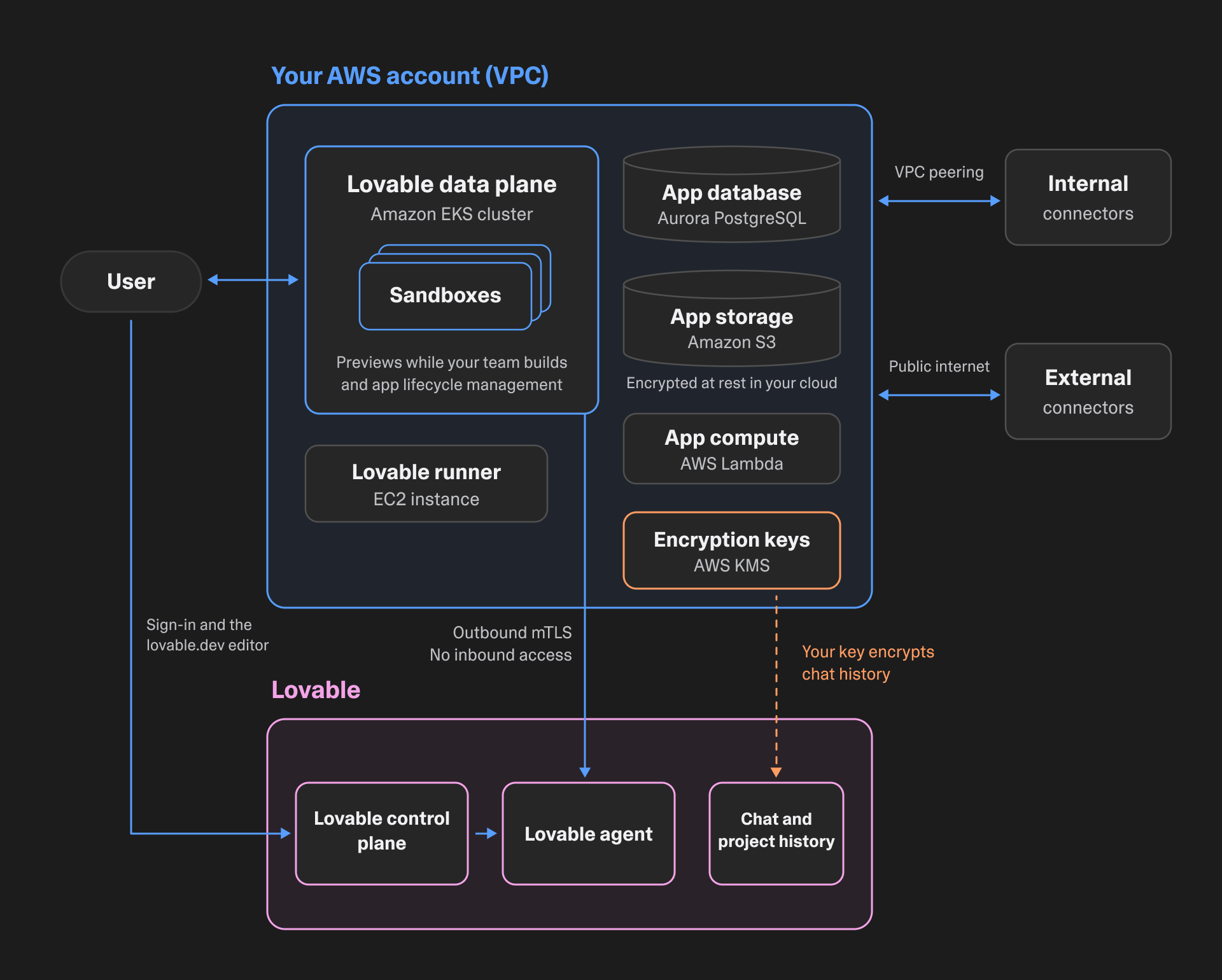
Some apps can't go to production until they run inside your own network. An HR app that reads from your HR system is a common example. With Deploy on AWS and Deploy on Azure, Enterprise teams can run those apps and the data behind them in their own cloud account. Both are in private preview.
People keep building in Lovable the same way they do today. Preview sandboxes, published apps, the app database, file storage, and app logs run in a dedicated network inside your account. Apps reach internal systems like your data warehouse over VPC or VNet peering. Those systems stay off the public internet. Lovable installs and updates everything it deploys there. Your Enterprise security controls still apply.
Deutsche Telekom went live in October with its Lovable apps running in its own AWS account.
Read how it works in Deploy your Lovable apps in your own AWS account and Deploy on Azure: keep your Lovable apps in your own subscription. The Azure post also covers the other ways to build with Lovable on Microsoft. To join the private preview, talk to your account team or email byoc@lovable.dev.
Bring your own key
When you deploy in your own cloud, chat and project history still stay with Lovable. Bring your own key puts that history under your control too. Admins connect their own encryption key in Workspace settings. Lovable encrypts the history with it. If you revoke the key, Lovable can no longer read the history.
Bring your own key is in private preview. Today it works with AWS KMS in workspaces that use Deploy on AWS. Azure Key Vault support is rolling out with Deploy on Azure. We're also working on it for workspaces hosted on Lovable. Your account team can walk your security team through how it works.
EU inference
For European companies, the security review often asks where the AI processes requests. By default, Lovable sends AI requests to the standard endpoints of the model providers on our subprocessor list. Those providers can process requests in the U.S. EU inference keeps an Enterprise workspace's AI model requests on model endpoints in the EU, while you build and for the AI features in your published apps. A request that no EU endpoint can serve fails rather than running elsewhere.
A workspace owner or admin turns it on in Privacy & security settings. If you also use Deploy on AWS or Azure, your apps and their data run in your cloud while EU inference covers the AI requests.
Read EU inference: control where AI processes your requests. The EU inference docs list which models and features are available with it turned on.
Organizations
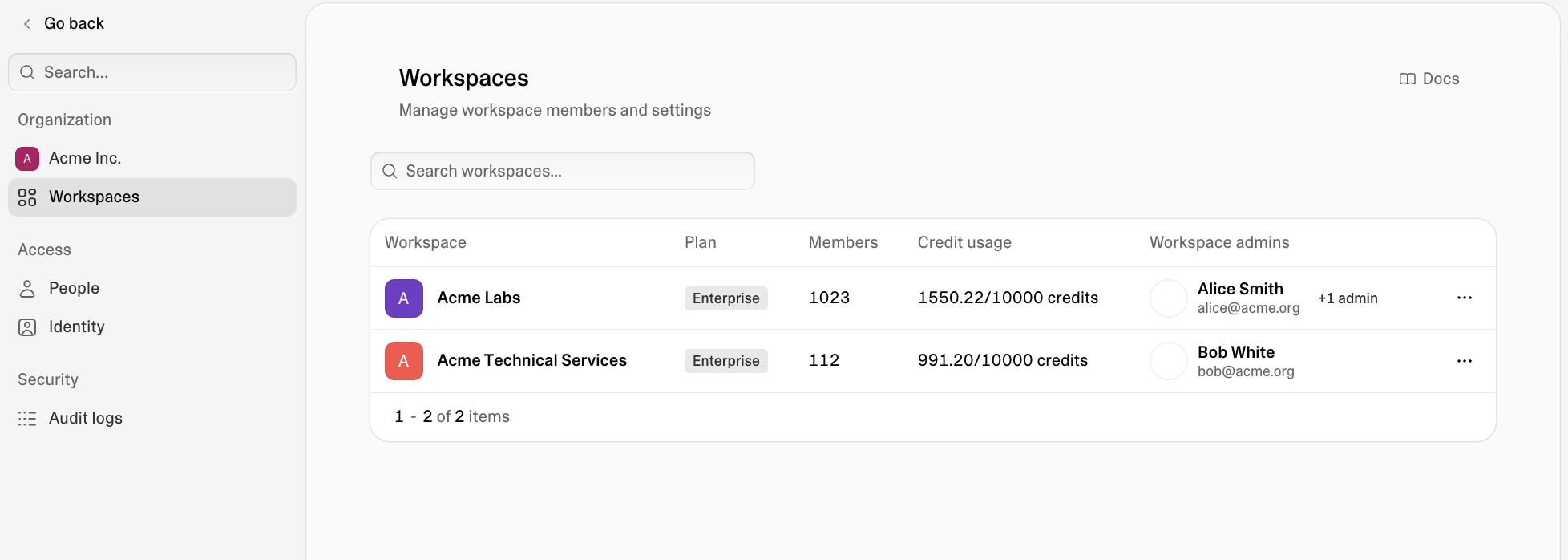
Large companies often run several Lovable workspaces, one for each team or region. In a federated model, the central team still owns identity for all of them. With Organizations, IT sets it up once.
From the organization console, you can:
- Set up SSO and SCIM for every workspace in the organization
- Map groups in your identity provider to the workspaces people should land in
- See every member and the workspaces they belong to
- Lock identity settings so workspace admins can't change them
- Block people from creating workspaces IT hasn't approved
- Review audit logs across every workspace in the organization
Teams can also publish internal apps to the whole company. A workspace owner or admin picks the organization audience in the publish dialog. Only people in a workspace in your organization can open the app. The project stays in its own workspace.
Organizations is also where admins set up Deploy on AWS and Azure workspaces. It's available on Enterprise. Reach out to your account team to turn it on.
Learn how to publish to your organization.
Workspace policies and approvals
Workspace policies are where the central team decides what needs a review before an app goes to production. Admins can let more people publish and still check the apps that matter. A policy either blocks an action or requires an admin or owner to approve it first. The first policies cover publishing. When no policy applies, the app publishes without a review.
You can turn on policies to:
- Restrict publishing while a project has unresolved PII findings (this replaces the Block publishing with PII setting)
- Require approval when external collaborators publish
- Restrict publishing apps publicly
- Require approval to publish apps that use connectors
- Block publishing from email addresses outside your verified domains
When a policy requires approval, the person publishing sends a request with a note. Every admin and owner gets it in Lovable and by email. Once one of them approves, Lovable publishes the app. Later updates go out without a new request until something the policy checks changes, like the app's connectors or who can view it.
For the connectors and external collaborators policies, the setup dialog shows how often the policy would have required approval in the last 30 days. Policy changes and approval decisions show up in your audit logs. People keep building and previewing while a request waits.
More policies are coming, starting with who can publish and holding apps with open security findings. Later ones go beyond publishing.
Workspace policies and approvals are available on Enterprise. Read the workspace policies docs and Privacy & security settings.
Action center
Admins and owners approve requests in the new Action center. It also flags other things in the workspace that need a decision:
- Projects whose owner left the workspace
- Projects whose credit usage rose sharply
- Public apps with critical security findings
- Public apps nobody has edited for months
You can act on each one from there, for example by assigning a new owner or unpublishing the app.
The Action center is available on Business and Enterprise. Approval requests need Enterprise. Read the Action center docs.
The Lovable API for workspace admins
Central teams want to manage Lovable the way they manage every other tool they run. The Lovable API lets them pull usage and security data into their own dashboards instead of exporting it manually. It works from your own scripts and agents. It's available on Business and Enterprise. Admins use it to:
- Read workspace settings and list members and groups
- Pull project and workspace analytics
- Poll security scans and workspace security insights across every project
- Publish, unpublish, update, and delete projects
- Read PII labels and the project security inventory (Enterprise)
Credit usage and credit limits are coming to the API next. Admins will be able to track spend and set limits from the same scripts.
Owners and admins create API keys in Workspace settings. You can also register OAuth clients so your own apps connect to Lovable with each person's permission.
Learn more:
Audit log export to your SIEM or cloud storage
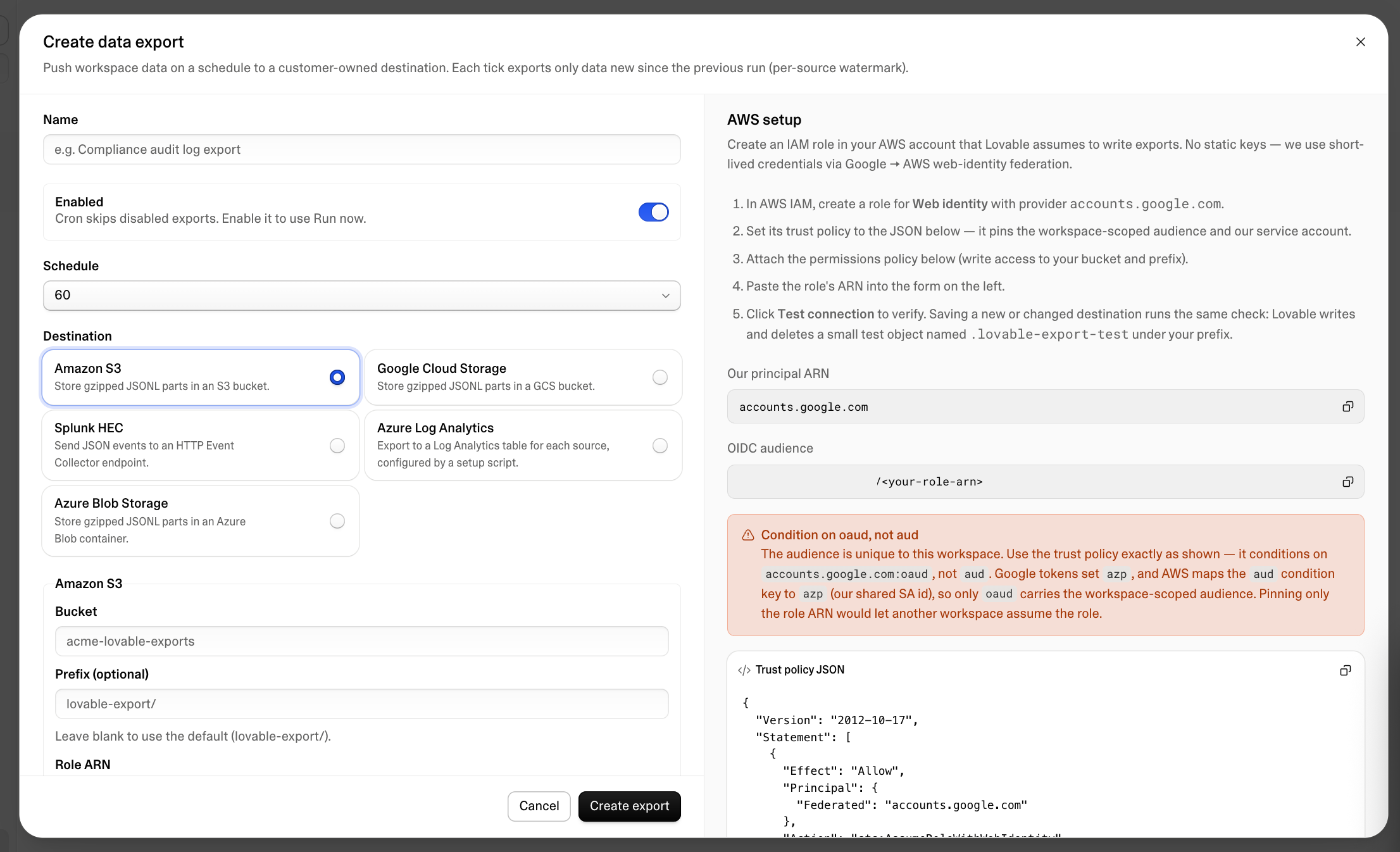
Security teams can now watch Lovable activity from the tools they already monitor. Lovable sends your workspace's audit logs to Splunk or another destination you own every hour or every three hours. Each run sends only what arrived since the last one.
Logs can go to:
- Splunk
- Azure Log Analytics
- Amazon S3
- Google Cloud Storage
- Azure Blob Storage
Lovable keeps audit logs for 13 weeks. With an export, you keep your own copy for as long as your policy requires. Lovable signs in to AWS, Google Cloud, and Azure with short-lived credentials your cloud account trusts. There's no long-lived key to manage. Workspace settings has step-by-step setup instructions for each destination.
Learn more:
- Data exports overview
- Splunk setup guide
- Azure Log Analytics setup guide
- Amazon S3 setup guide
- Audit logs
What's next
We're building settings that apply to every workspace in an organization at once. On Deploy on AWS and Azure, we're working toward full feature parity with hosting on Lovable. Deploy on Google Cloud is on the way.
Workspace policies, the Action center, the Lovable API, and audit log exports are live today. Talk to your account team to set up Organizations or to try Deploy on AWS or Azure. New to Lovable Enterprise? Speak to a member of our sales team.