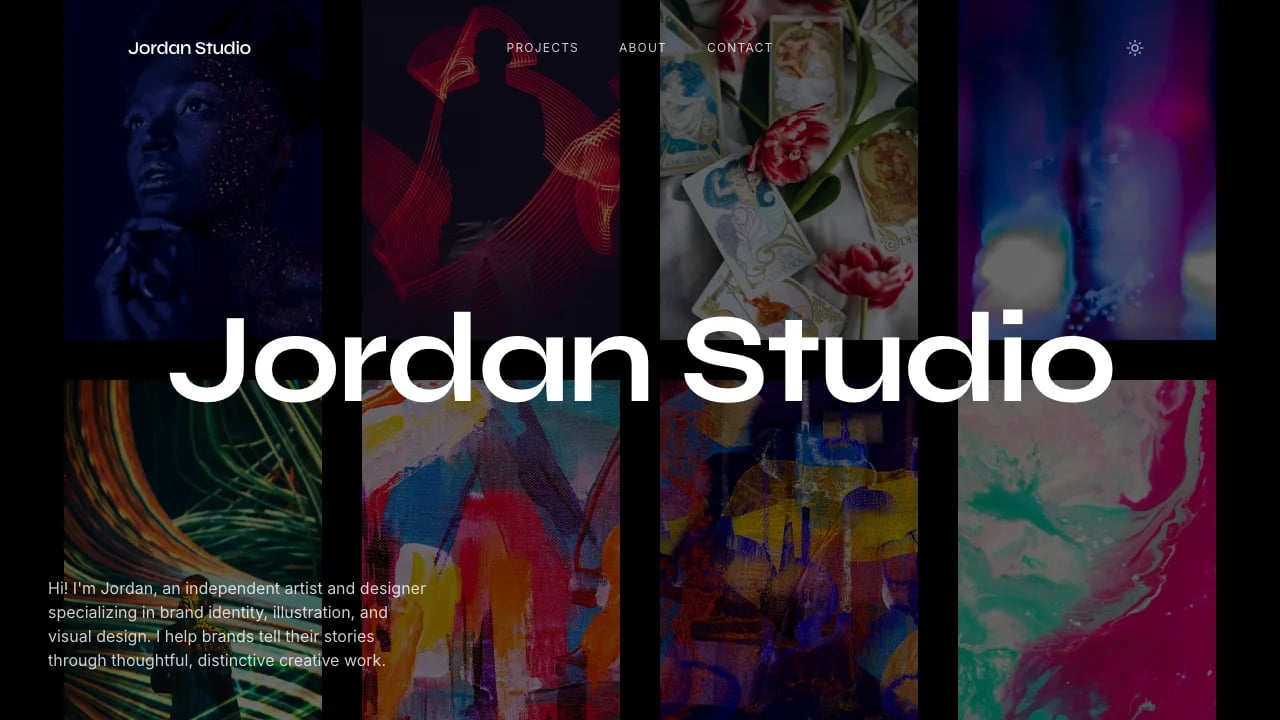
Warm Design Portfolio
Launch your designer portfolio that wins premium clients in hours, not weeks. Showcase case studies with polished layouts and smooth animations—no coding required.
 Lovable
Conçu pour
- Solo designers and creative consultants
- Presenting client-facing case studies
- Winning competitive pitches with portfolio presence
- Documenting experimental & personal projects
Points clés
- Corner navigation
- Case study templates
- Scroll-triggered animations
- Warm minimalist palette
- Impact metrics grid
- Explorations gallery
- Fluid viewport typography
- Sequential project navigation
- CSS variable theming
Technologies utilisées
Bibliothèques
- React
- TypeScript
- Tailwind CSS
- shadcn/ui
- Recharts
- Framer Motion
- Embla Carousel
- Vaul
- React Resizable Panels
Déploiement
- Lovable
- GitHub
À propos de ce modèle
This template gives you a designer portfolio that looks custom-built, and you don't need coding skills to make it work. No wrestling with page builders or hiring developers.
The technical parts are already handled. Mobile responsiveness, scroll animations, sequential project navigation—all done. You can focus on showcasing your work while the template handles the technical complexity.
The design puts your work first. Large typography makes project names memorable. Clean layouts let each case study stand out. Nothing distracts from what you've built.
Best Use Cases
Client-Facing Portfolio: Present your strongest case studies with the structure clients expect. Each project page guides visitors through your design process, contribution, and measurable impact. This helps you prove your business can work and win competitive pitches with clients who need to see concrete results beyond aesthetics.
Personal Brand Building: The professional presentation helps you compete against better-funded competitors. Sequential project navigation keeps visitors engaged with your work, avoiding the amateur or template-based look that makes prospects leave after viewing just one project without exploring your full capabilities.
Artisan Portfolio Showcases: Display case studies with consistent structure that supports professional service delivery. Add new projects as you complete client work—the repeating format makes updates simple.
Experimental Work Documentation: Showcase personal projects separate from client case studies. The Explorations page lets potential clients see your range beyond polished deliverables, helping you avoid getting pigeonholed while proving you're exploring new directions.
Getting Started
Step 1: Remix This Template
Click "Remix" to create your copy. You'll have a complete designer portfolio template ready to customize. All the pages and features are already working—you just need to make it yours.
Step 2: Customize Your Brand
Change the cream background color to match your aesthetic. Update typography sizes for project titles to reflect your style. Lovable's visual editor lets you modify layouts and see changes instantly as you work. You don't need to know code to make it look exactly how you want.
Step 3: Add Your Content
Replace the sample case studies with your actual projects. Each case study page follows a proven structure: project overview, contribution details, image grids, impact metrics, and next project navigation. Upload your best project images, write case study narratives that explain your process, and document the measurable results you achieved. The template stays out of your way so your work is what potential clients notice first.
Step 4: Connect Your Tools
Add your social profiles in the navigation. Connect your contact methods through mailto: links or scheduling tools. Lovable has built-in integrations for the tools designers use to maintain their online presence.
Step 5: Go Live
Deploy your designer portfolio with one click. Lovable handles the hosting, security, and performance optimization automatically. Your portfolio goes live worldwide in minutes, and you can start sharing the URL with potential clients through pitch emails, LinkedIn profiles, and presentations.
Conclusion
This designer portfolio template works for designers and creative professionals who want to win high-value projects with a professional online presence. You get structured case studies without building layouts yourself, smooth animations without coding interactions, and professional presentation without hiring a developer.
Whether you're launching your first portfolio or upgrading from an outdated site, this template gives you everything needed to showcase your creative work professionally and win clients who value design quality. The template includes everything you need—navigation that stays accessible without cluttering your projects, sequential connections between case studies, and layouts that adapt from desktop to mobile. Focus on your work while the template handles the presentation.
Fonctionnalités et possibilités
Editorial Corner Navigation
Distinctive four-corner fixed navigation system inspired by premium editorial design, creating an uncluttered, gallery-like browsing experience with persistent wayfinding.
Viewport-Scaled Display Typography
Massive project titles using fluid viewport units that scale proportionally across all screens, creating dramatic visual impact and professional typographic hierarchy.
Scroll-Triggered Reveal Animations
Framer Motion scroll animations with custom cubic-bezier easing create sophisticated entrance effects that enhance perceived performance and guide user attention through content.
Sequential Project Navigation
Built-in next-project navigation creates a looped storytelling experience that keeps visitors engaged and exploring your entire portfolio without returning to homepage.
Structured Case Study Template
Repeatable case study architecture with hero, overview, contributions, impact metrics, and reflection sections ensures consistent, professional project presentation across all work samples.
Warm Minimalist Design System
Sophisticated cream background with high-contrast dark text creates an elegant, gallery-quality aesthetic that makes visual work stand out while maintaining exceptional readability.
Impact Metrics Showcase
Three-column grid layout with oversized numbers and descriptive labels lets you quantify project outcomes and business results with immediate visual authority.
Experimental Work Gallery
Dedicated explorations page with category tags and technology pills showcases personal projects and experimental work, demonstrating breadth beyond client projects.
Mobile-First Responsive System
Fluid typography and adaptive layouts ensure professional presentation across all devices, with display text that scales proportionally from mobile to desktop viewports.
CSS Variable Theming Architecture
HSL-based color system with custom properties enables effortless brand customization and potential dark mode implementation without touching component code directly.
Performance-Optimized Animations
All motion uses GPU-accelerated transform and opacity properties with once-only scroll triggers, ensuring smooth 60fps animations without performance degradation on lower-end devices.
Single-Page Architecture Foundation
Homepage combines hero, work, about, and contact in one scrollable experience with hash navigation, reducing cognitive load and creating seamless portfolio discovery.