Companies spend real time and money setting up their data warehouses, CRMs, and recruiting tools, with careful rules about who can see what. A Lovable app can now honor those rules exactly. Each person connects with their own access, so a dashboard shows them only the records they're allowed to see and nothing else. If they cannot see something in the source system, they cannot see it in the app either.
This type of per-user access unlocks a lot, and it introduces risk that a shared-credential app never had. A builder can make an honest mistake and ship an insecure app. Someone can act in bad faith and try to reach data that isn't theirs, whether that's a builder harvesting a colleague's access or a person being phished into a malicious app. Or an outside attacker can try to steal a credential through a cloned app, a prompt injection, or a misdirected request.
The rest of this post is how we address each one: who can connect and how much an app can act on its own, how credentials are handled so the app never holds one, what gets caught before and after an app ships, and what an app is allowed to store.
Initial setup: connector scope
Admins can set up connections with specific scopes and for specific users. Those decisions include:
- Decide what connectors you want to enable.
- Decide if you are enabling offline access.
- Create an OAuth client in the connector.
- Decide which scope to give to that connector — read only, write only, etc.
- Decide who can access this connector.
They can then decide how users interact with the data.
Two access modes: session-bound vs. offline access
There are two modes for which users can interact with connector data: browser-only (session-bound) and offline access.
With browser-only, the app acts on someone's data only while that person is signed in and using it. Every request provably originated from that user's live session, so you can build an app where every employee sees their own salary and you, the person who built it, never see anyone else's. This is the default recommendation for enterprises, and browser-based access is always on.
With offline access, the app can act on someone's data when they are not signed in. This is what lets you build background agents and scheduled workflows, like a brief that lands every morning or an overnight sync. It is powerful precisely because it removes the live-session guarantee: the app holds standing access and can effectively act as a user while they are away. It's required to be turned on deliberately by an admin, one connector at a time.
The app never holds a credential
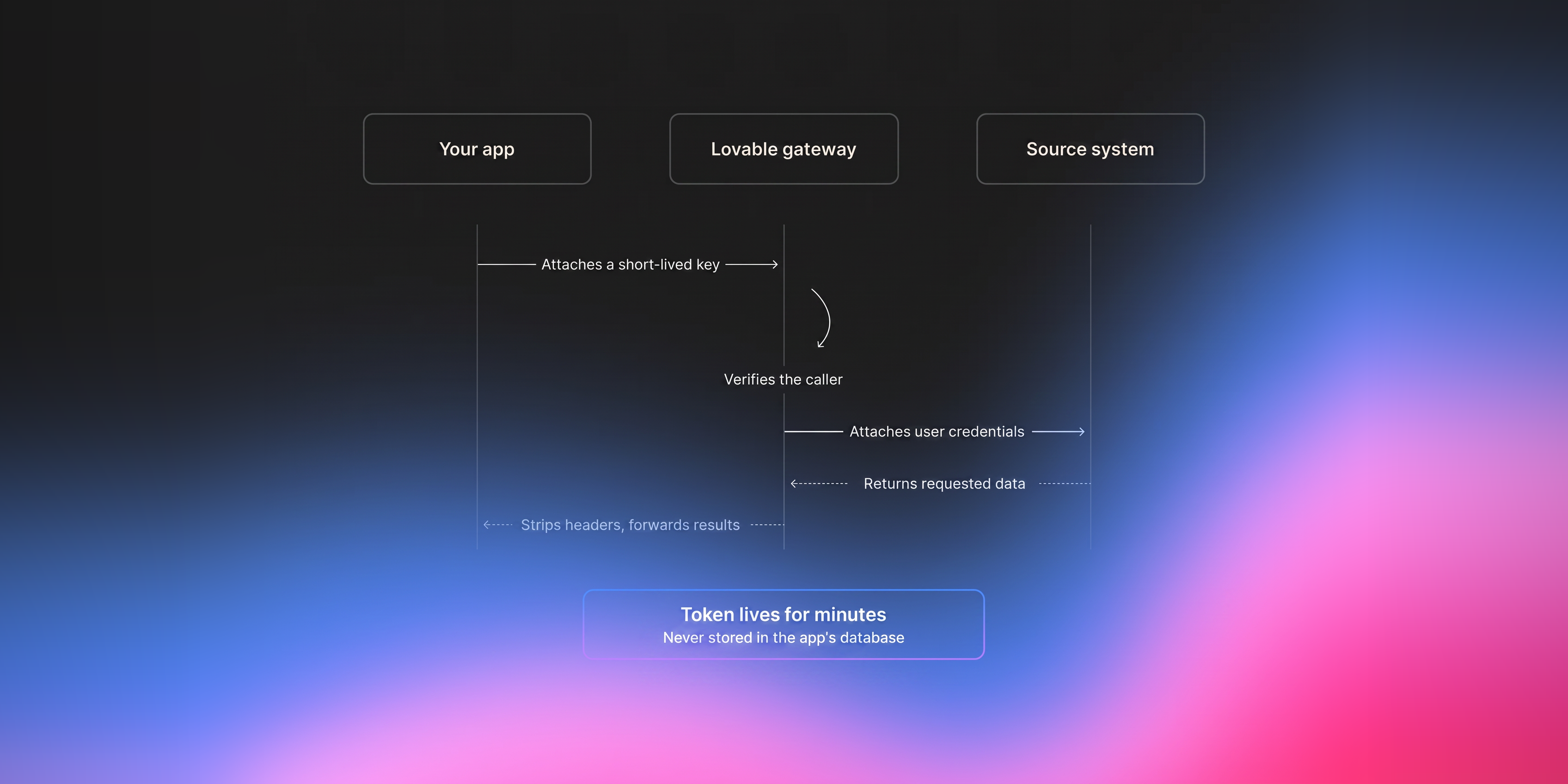
No matter which mode you choose, an app will never receive the real credential it is acting with. When someone connects an account, Lovable stores that credential server-side, and encrypted. When the app wants to do something, it does not send a token. It names a connector and an intent, like "fetch this user's recent emails," and hands our gateway a short-lived key tied to that specific signed-in person. The gateway looks up the real credentials, attaches it in transit, and forwards the call.
For workspaces that have disabled 'offline access', the following is true:
The token lives for minutes, is never written to the app's database, and cannot be read back by anyone: not the builder, workspace admin, or Lovable's own AI.
This means, a builder can prompt 'fetch everyone's emails,' but there is no stored token in the app to complete it. And because every outbound call carries the real person's identity rather than a shared key, one user's access can never act as another's, and audit logs will reflect who actually did what.
Why a misdirected call can't leak tokens
Every connector is pinned to a single destination. When a connector is registered, the gateway records exactly one base address it is allowed to reach. For Slack, that is https://slack.com. That mapping lives on our servers, not in your app, and the app cannot change it. On each request, the gateway rebuilds the outbound call against the pinned address and overrides the destination host with the registered one. A request can only ever go where that connector is allowed to go.
As a result, this closes a significant security threat. Imagine a prompt injection, a malicious app, or an honest mistake produces a request that looks correct but points at the wrong server. In an ordinary setup that call would carry your access token to that server, and now a stranger holds a working credential, the same as if you had emailed someone your password. In this design the destination is not the app's to choose. The gateway fixes the destination first and attaches the credential second, so a misdirected call does two things: it fails, and it never carries a credential anywhere it should not go. The token cannot be sent to the wrong place because the app was never able to set the place.
That is hardened by our platform. The gateway refuses any path that tries to smuggle in its own scheme or host, that contains user-info or .. traversal, and it routes through a transport that blocks requests to internal addresses. Before forwarding, it strips Lovable's own authorization and connection headers so nothing about how the request was authenticated leaks upstream. And it verifies the credential belongs to the calling context before anything moves, which is the next section.
Why this is safer than other tools
Lovable is one of the first AI software creation platforms to offer this setup for connecting to data. Here's a cheat sheet:
| What usually happens | How Lovable does it | Why that's safer |
|---|---|---|
| The connection credential lives in the app's own code or database | The key lives in a centralized credentials storage and is fetched at run time by the connector gateway | A leaked or cloned app has no key to steal |
| Everyone shares the builder's login and sees the builder's data | Each person connects their own account and sees only their own | No one is exposed to data that isn't theirs |
| A misdirected request can carry your token anywhere | The key is pinned to one destination and never leaves the gateway | A misfire fails instead of leaking your credential |
| The app can act as you whenever it wants, even when you're gone | It acts only while you're signed in, unless an admin grants more | A builder can't act as you behind your back |
| You hope the builder set the security up right | Scans run automatically as it's built and when it ships | Common mistakes get caught before real data is touched |
Choosing the right data storage model
Admins choose what projects can persist through Lovable's Custom Knowledge feature. Permissions live in the source system. The moment you copy third-party data into Lovable's own database, it leaves the system that knows who is allowed to see it, and those upstream rules do not follow it. There is no faithful way to replay another platform's access model inside ours, so here is how to think about where data should live depending on the app:
- Simple apps that don't need to store data, where each call is cheap (dashboard, a per-employee CRM view): don't store the data in Lovable's database. The third-party's permissions are then checked on every API call, so the source system stays in control of who sees what.
- Apps where each page load is expensive or slow (a dashboard with heavy computation): store the data in Lovable's databases.
- Complex tools that combine Lovable's data with third-party data: store the primary data, or all of it, in Lovable's databases.
You can steer Lovable towards any of these by expressing your preference in custom Knowledge. Here is exactly what we'd recommend:
- Store nothing. The app passes data through and keeps no state of its own. You can still read from and write to the source system, so dashboards and enrich-and-write-back workflows (score a lead, push the result back to HubSpot) work fine. What you give up is linking records across systems inside Lovable, because there is nothing persisted to link.
- Store keys only. The app may persist the identifiers and non-sensitive data it generates and link them by primary key, without copying the sensitive fields. For example, an operations dashboard pulls live PII and business metrics (which drivers are active in a city, the revenue they are driving) and also records actions the app took, like an email being sent. You keep the link between a city and those actions, stored by key, without landing the PII or the sensitive metrics in our database. For most sensitive apps this is the right default.
- Store anything. Full persistence, for higher-trust, lower-sensitivity cases where you have decided the tradeoff is acceptable.
What Lovable handles, and what stays with your team
Lovable runs the credential layer end to end: authentication, token refresh (done at request time, with a reconnect prompt after repeated failures rather than silent breakage), encrypted storage, and immediate deletion the moment a connection is removed.
What stays with your team is the connection to the provider itself. You choose whether an app uses Lovable's managed OAuth client or registers your own, and you decide which scopes it can request. For an internal tool with your own client, wiring it up is an admin action inside your own provider, like trusting or allowlisting the OAuth client for your organization, not a public app review. The heavier verification some providers require, such as Google's CASA review, only comes into play if you take your app beyond your own organization to outside users. And to be precise about scanning, it catches common risks automatically, but it doesn't certify an app is secure. Deciding whether a given app is right for the data it touches stays your team's call.
And a few limitations to call out. This setup doesn't stop someone from seeing data they were already authorized to see. It limits, but doesn't fully eliminate, the risk of a builder reading data that passes through their own app. And one person's access can't automatically transfer to someone else, so a manager inheriting a direct report's calendar isn't supported.
For your security review
For teams who need the operational detail: gateway requests originate from a fixed set of IP ranges you can allowlist (IPv4 185.41.150.0/25, IPv6 2a07:8241:fca::/48), at up to 1,000 requests per minute per connector per project. On every request the gateway pins the destination to the connector's registered host, rejects any request whose credential is not bound to the calling workspace and project, strips Lovable auth and connection headers before forwarding, and blocks path-based scheme, host, user-info, and traversal tricks as well as requests to internal addresses. Credentials are encrypted at rest, keyed to a verified user identity, issued to the app only as short-lived tokens, and refreshed at request time. A basic scan runs at publish in seconds; a deeper AI-powered review is available on demand.
If you want to go deeper on the token exchange, the review process, or how a specific connector is scoped, read the app user connector docs or get in touch.