
If you keep seeing "MCP" and nodding along without fully knowing what it means, this one's for you.
AI assistants are most useful when they can work with access to the right tools and context. Model Context Protocol (MCP) gives AI tools one standard way to interact with and take action in other tools.
In this post, we'll break down what MCP is and three ways you can use it with Lovable:
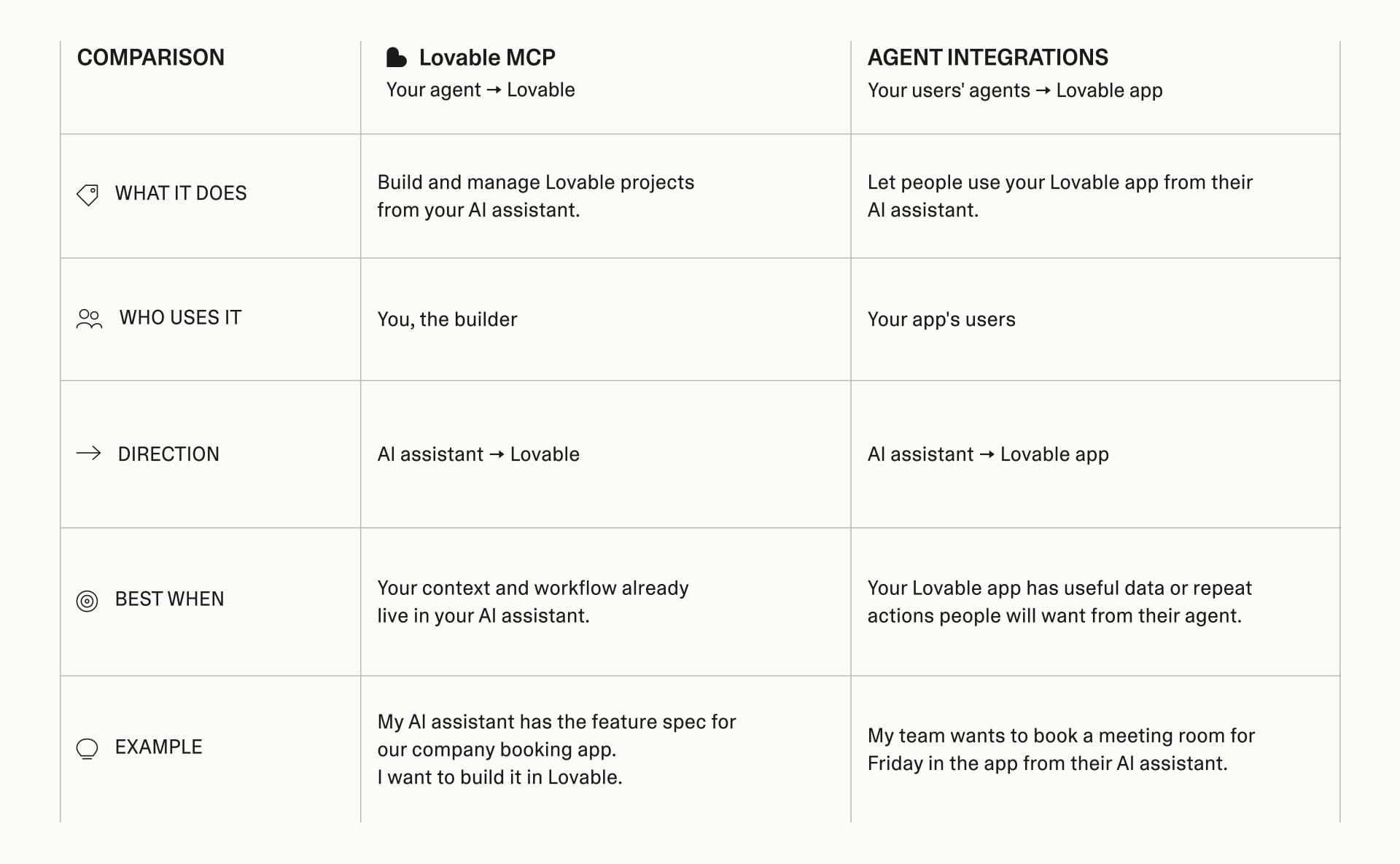
- Build with Lovable from your AI tool of choice. The Lovable MCP lets AI assistants create, inspect, and update Lovable projects across your workspace.
- Make your Lovable-built apps available in AI tools. Add an MCP server to any app so your users can work with it from their AI assistant.
- Bring more context into Lovable. Connect tools like Notion, Linear, Jira, and Granola to your Lovable account, then build with the context they already hold.
What is MCP?
MCP stands for Model Context Protocol. It gives AI assistants one standard way to interact with other applications and take action in them.
Without MCP, every connection is hand-built around each app's API.
Picture a restaurant. The API is the kitchen's ordering system: it defines the exact requests the kitchen accepts. MCP is the menu given to the customer, in this case the AI assistant. The menu describes what is available and how to order it—but does not require the customer to understand the full complexity of the kitchen. The assistant reads that menu, chooses the right action, and sends their order.
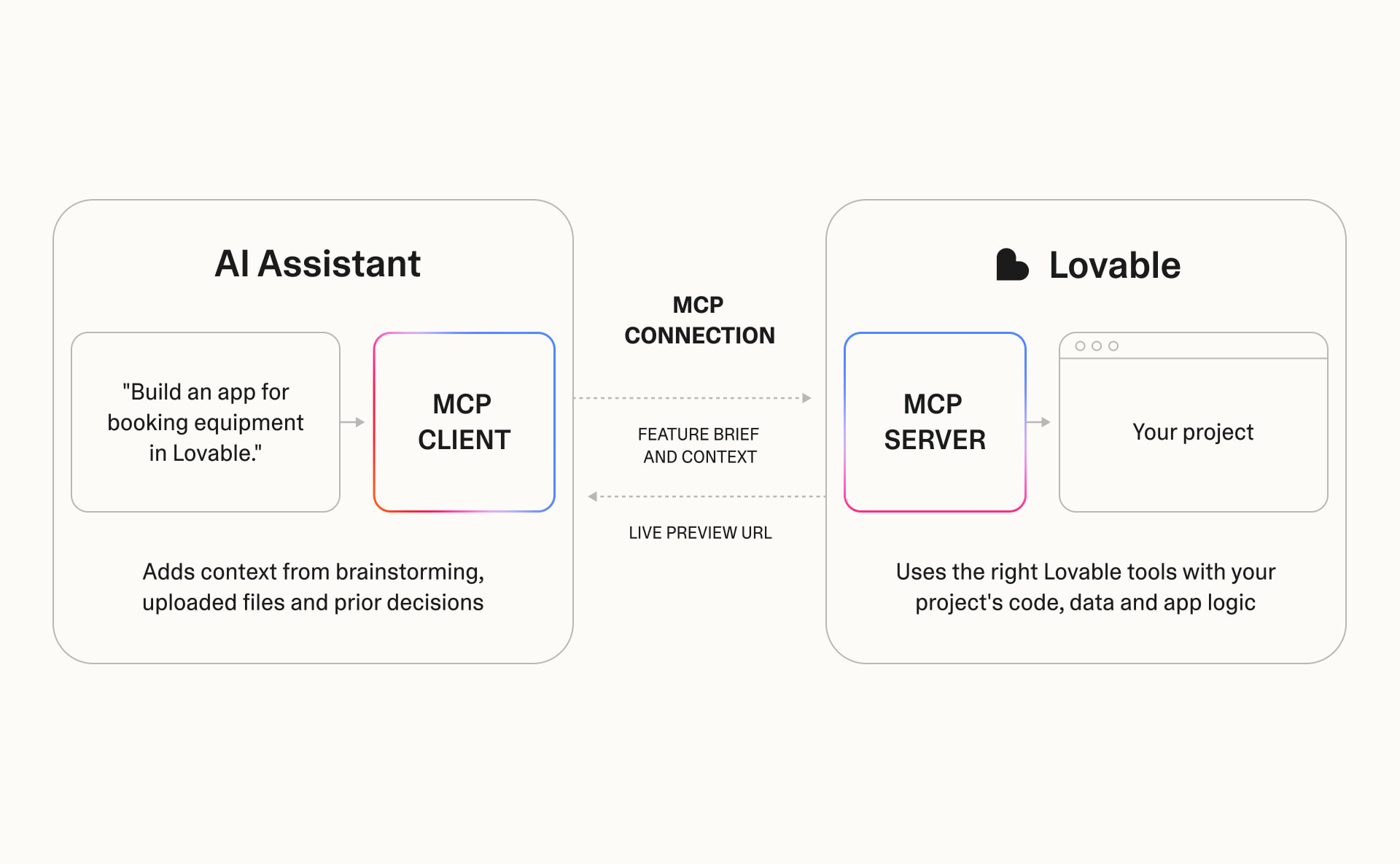
In practice, every MCP connection has two sides:
- MCP client: makes the request on your behalf to another tool.
- MCP server: answers the request when it is "called" by the MCP client.
Build with Lovable from your AI tool of choice
Here's what this workflow looks like in practice. Add the Lovable MCP server at https://mcp.lovable.dev and authenticate with your Lovable account. A compatible AI tool can then act on your behalf to build with Lovable. Connect the Lovable MCP directly to MCP-compatible AI tools such as Claude, ChatGPT, Cursor, VS Code, and Codex. Lovable is also available as an out-of-the-box MCP agent in Atlassian Rovo.
Once connected, your assistant can create projects, send build requests, inspect project files, check analytics, and continue iterating without leaving the conversation where your context already lives.
Example: Imagine your team has worked through the requirements for an equipment-booking app in Claude. That conversation already contains the team's policies, edge cases, and decisions. With the Lovable MCP connected, you can ask Claude to build the app with Lovable using that context. Claude chooses the appropriate Lovable tools and sends the request through the MCP connection. Lovable returns the project and preview URL through that same connection.
The Lovable MCP can be particularly useful when:
- A conversation already contains the full brief, requirements, or decisions for what you want to build.
- Your assistant can reach documents, project history, or other tools that should inform the build.
- You want to review files or compare patterns across Lovable projects without opening each one.
- You want to check project information or analytics before deciding what to change.
- You want Lovable to become one step in a broader workflow or automation.
Credits apply when the assistant asks Lovable to create or change something. Read-only actions such as listing projects, inspecting files, and checking analytics do not use credits.
Whether using two agents instead of one is more efficient depends on your plan tier and how much context you're moving between tools. A well-briefed agent can often get Lovable to the right result in fewer messages than a cold prompt would. MCP doesn't make a task inherently cheaper. It just means less time spent re-explaining yourself.
Try it: Add Lovable in your AI assistant's connector settings, then ask it to turn something you're already working on into an app. It builds from the context in your chat, so you don't have to explain the idea twice.
Make your Lovable app available in AI tools
You can add an MCP server to any published app you've built with Lovable. Your users connect from a compatible AI tool and sign in. Their assistant can use only the actions you expose, with their existing permissions.
Ask Lovable to enable agent integrations. Lovable will propose a scope based on your app's functionality, including who can access the server, how they sign in, and which actions other apps can take. By default, Lovable recommends OAuth sign-in. It also runs a security check when you publish. You control who can use the integration (everyone, signed-in users, or paying users).
If in doubt, start with the minimum access your tool needs. Keep your tools narrowly scoped by choosing read-only access where possible, and expand permissions as your use case requires them. Review your connected tools periodically and remove access you no longer need.
Lovable hosts the MCP server and keeps it updated as your app evolves.
Adding an MCP server is especially useful when your app:
- Contains specialized tools, methods, or frameworks your audience wants to apply in their own work.
- Holds data people regularly want to query, summarize, or analyze.
- Supports ongoing transactions such as submitting, reviewing, approving, or progressing work.
- Handles repeat actions such as generating reports, creating quotes, updating records, or checking status.
Try it: Open any app and ask Lovable to add an MCP server to it. Review and tailor the proposed tool list before publishing. For starter prompts and templates with built-in MCP servers, visit Lovable Academy's Build Inspiration page.
Bring context into Lovable with personal connectors
Personal connectors use MCP to bring context from tools such as Notion, Linear, Jira, or Granola into Lovable while you build. Connect and authorize a tool, then you'll be able to access content from that tool while you're building in Lovable.
Personal connectors help you do things like:
- Reference customer feedback from Granola meeting notes while iterating on your app.
- Build from the requirements and acceptance criteria in a Linear or Jira ticket.
- Bring the latest product specs and decisions from Notion into your build.
Try it: Connect Granola and ask Lovable to update your app based on feedback from your latest customer call. The agent can reference the meeting notes as it works, so you don't need to copy everything into a new prompt.
Get started
However you want to use MCP, start with the workflow that matches what you're trying to do:
- If your best context already lives in another AI tool: connect the Lovable MCP and build with Lovable from there.
- If you want people to use your app from their own AI tools: add an MCP server to your published Lovable app.
- If your build depends on context from tools like Granola, Linear, or Notion: add a personal connector in Lovable.
Explore Lovable Academy for step-by-step setup guides, starter prompts, and examples you can try.