Splice Template
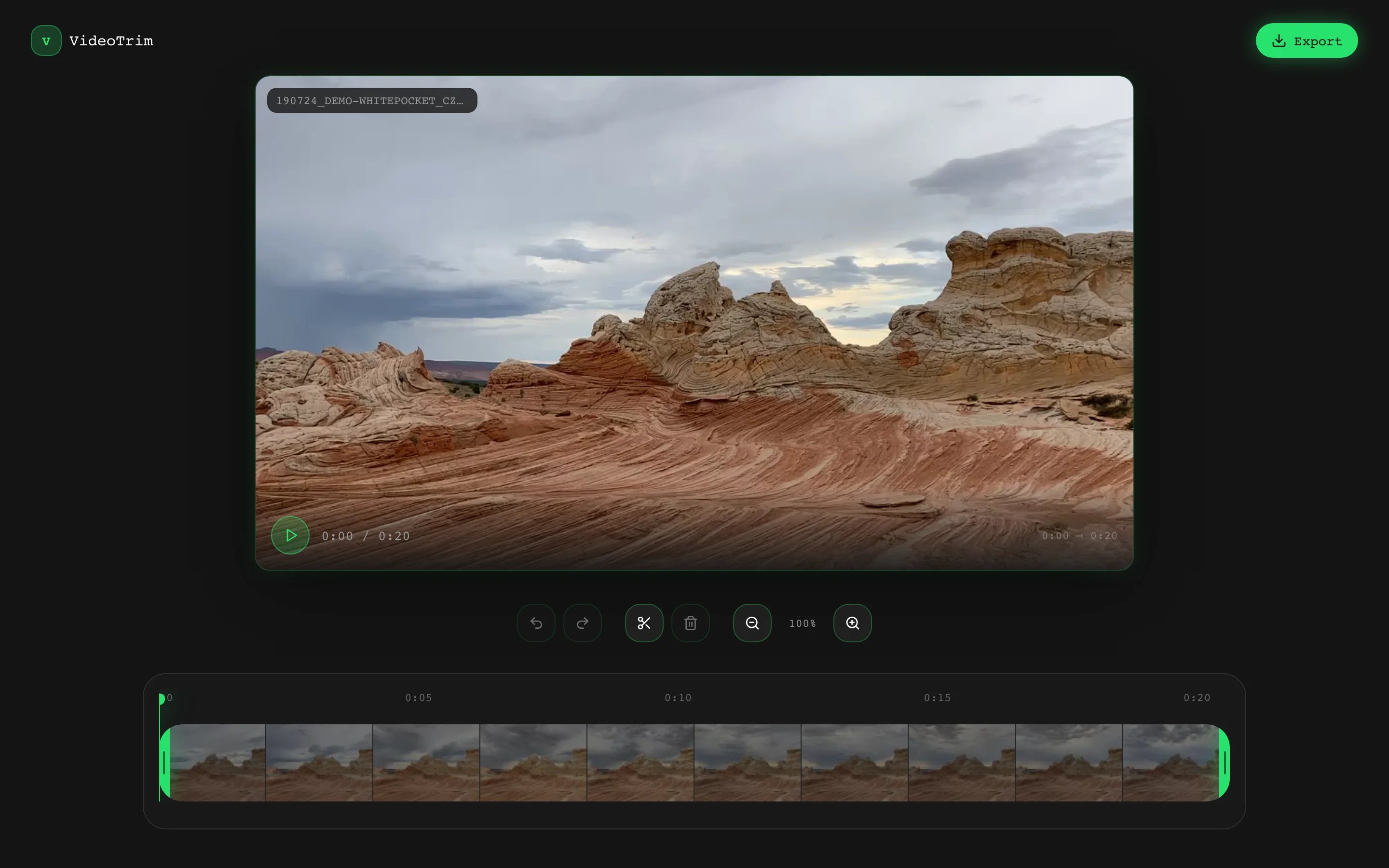
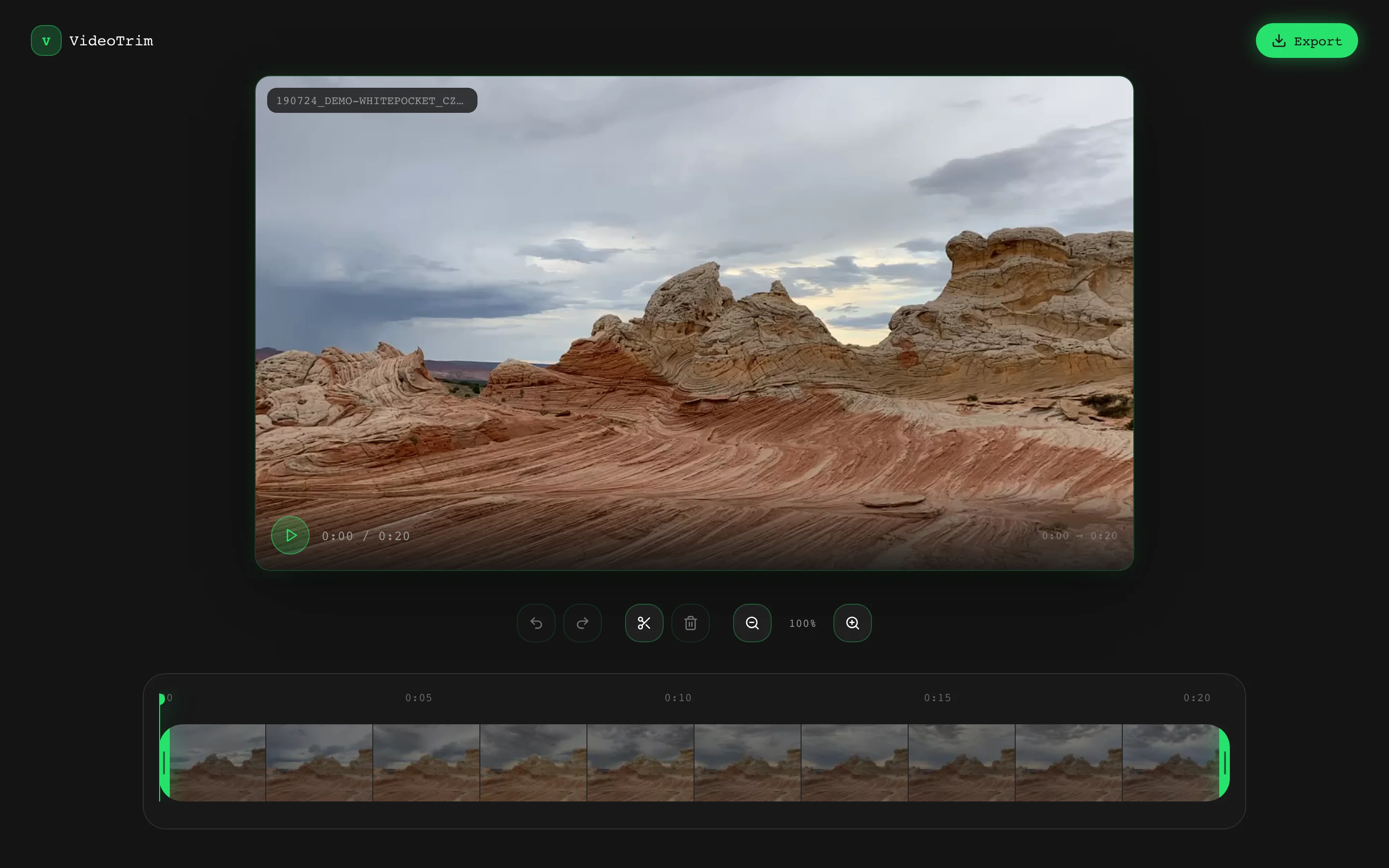
Browser-based video trimmer interface
ANAnton Gridz
·
Key Highlights
Custom Timeline Engine Built-In
Skip weeks of timeline UI development and start with draggable handles and keyframe thumbnails working.
Multi-Segment Playback Ready
Sequential gap-skipping playback lets users preview their trimmed video exactly as it will export.
Production-Ready Neon UI
Dark-mode interface with cohesive neon accents looks polished enough to demo to users today.
Full Keyboard Shortcut Support
Space, S, Delete, and Cmd+Z shortcuts give power users the fast workflow they expect.
Complete Undo/Redo History
Every edit is reversible so users can experiment freely without losing previous work.
Zero Backend Dependencies
Runs entirely in the browser with no server processing required for trimming operations.
Features & Capabilities
Production-ready features built with modern tech stack for exceptional performance and user experience
Loading live preview...
About this template
This template gives you a working browser-based video trimmer that looks polished out of the box, and you don't need to build a timeline component from scratch to make it work. Drag-and-drop upload, multi-segment trimming, keyframe thumbnails, and sequential playback are already functional. You start with a real tool, not a wireframe.
The technical parts are already handled. A custom timeline engine with draggable trim handles, auto-generated keyframe thumbnails rendered via off-DOM canvas extraction, a playback supervisor that skips between selected segments, and a full undo/redo history. All done. You can focus on wiring up the export pipeline, adding your own features, or adapting the UI to your product vision.
Two routes come ready to go: the main trimmer page and a 404 fallback. The trimmer page includes a DropZone with drag-and-drop file picking and neon glow feedback, a VideoPreview with custom hover controls and click-to-toggle playback, a Timeline with thumbnail strips and zoom-aware time markers, and an EditorControls panel with transport, edit, and export button clusters. Keyboard shortcuts for play/pause, split, delete, and undo/redo work from the start.
Instead of spending weeks building a custom video timeline from zero or paying monthly for a white-label video editing SDK, you get a working trimmer interface in hours. Full control over every component, no recurring license fees, and code you can read and extend.
Who This Is For
- Developers prototyping a video editing product who don't want to spend weeks on timeline UI boilerplate before reaching the interesting problems
- Solopreneurs building a SaaS video tool who need a functional starting point that looks professional enough to demo to early users
- Product builders at tech companies who need a working video trimmer prototype to validate a concept with stakeholders this week, not next quarter
- Agency teams pitching a media tool concept who need a live, interactive demo instead of static mockups that can't show real interactions
- Technical founders evaluating browser-based video workflows who want clean TypeScript/React code they can inspect, extend, and own completely
Best Use Cases
Browser-Based Video Trimming Tools
Launch a video trimming tool that runs entirely in the browser with no server-side processing. The custom timeline engine, multi-segment selection, and gap-skipping playback give users a real editing experience. For SaaS founders, this is a working MVP interface you can put in front of beta users and start collecting feedback on day one.
Internal Media Processing Dashboards
Build a trimming step into an internal content pipeline for marketing or media teams. The drag-and-drop upload, segment selection, and keyboard shortcuts (Space, S, Delete, Cmd+Z) make the workflow fast for repeat users. Teams that process video regularly save hours per week when trimming happens in the browser instead of a desktop application.
Video Feature Prototypes
Test a video editing concept with real interactions before committing engineering resources to a full build. The timeline with draggable handles, keyframe thumbnails, and playhead scrubbing demonstrates complex functionality that static designs cannot communicate. Product teams that present interactive prototypes get faster stakeholder approval and clearer feedback.
Media SaaS Products
Use the trimmer as one feature inside a larger video platform you're building. The component architecture (DropZone, VideoPreview, Timeline, EditorControls) is modular, so you can integrate individual pieces into your own layout. Founders building media tools can ship their first usable feature faster and start acquiring users while the rest of the product takes shape.
See yourself in one of these? Remix this template and start building.
What You Can Build
This template gives you the foundation for:
- A standalone video trimming tool where users drag, drop, split, and preview clips directly in their browser with no installs required
- A prototype for a media SaaS product, complete with multi-segment timeline, keyframe thumbnails, and sequential playback you can demo to investors or beta users
- An internal video processing step embedded into a larger content workflow, with keyboard shortcuts and undo/redo that power users expect
Getting Started
Step 1: Remix This Template
Click "Remix" to create your copy. You'll have a complete browser-based video trimmer ready to customize, including the main trimmer page with DropZone, VideoPreview, Timeline, and EditorControls, plus a 404 route. All the components and interactions are already working. You just need to make it yours.
If this template isn't the right fit, you can remix a different one. No wasted work.
Step 2: Customize Your Brand
Change the neon green accent color to match your brand. The color system uses HSL CSS variables, so updating the primary color (142 76% 52% by default) updates glow effects, button highlights, trim handles, and the timeline accent in one place. Update the Geist Mono font if your product calls for a different typeface. Lovable's visual editor lets you modify layouts and see changes instantly as you work. You don't need to know the color system internals to make it look exactly how you want.
Step 3: Add Your Content
Replace the default heading ("Trim your video in the browser") with your product name and copy. Update the DropZone prompt text to match your audience. If you're building a branded tool, add your logo and adjust the layout grid to fit your product's structure. The template stays out of your way so your product identity is what users notice.
Step 4: Connect Your Tools
Wire up the Export button to an actual encoding pipeline. The button currently shows a confirmation toast, so this is where you add FFmpeg.wasm, a MediaRecorder workflow, or a server-side render endpoint. Add authentication if your product requires accounts. Connect analytics to track usage patterns. Lovable has built-in integrations for the tools product builders actually use.
Step 5: Go Live
Deploy your video trimmer with one click. Lovable handles the hosting, security, and performance optimization automatically. Your tool goes live worldwide in minutes, and you can start sharing the URL with beta users, stakeholders, or your audience.
Conclusion
This video trimmer template works for developers and product builders who want a functional starting point instead of an empty canvas. You get a custom timeline engine without building one from scratch, multi-segment playback without debugging requestAnimationFrame loops yourself, and a dark neon UI that looks production-ready without hiring a designer.
Whether you're prototyping a video SaaS concept or building an internal media tool for your team, this template gives you a solid foundation. The keyframe thumbnail generation, draggable trim handles, keyboard shortcuts, and undo/redo history all work from the start. The template is free and takes a few hours to customize. You could have a working demo ready to share by tonight.