ClientOS Template
Client-ready project management board
Key Highlights
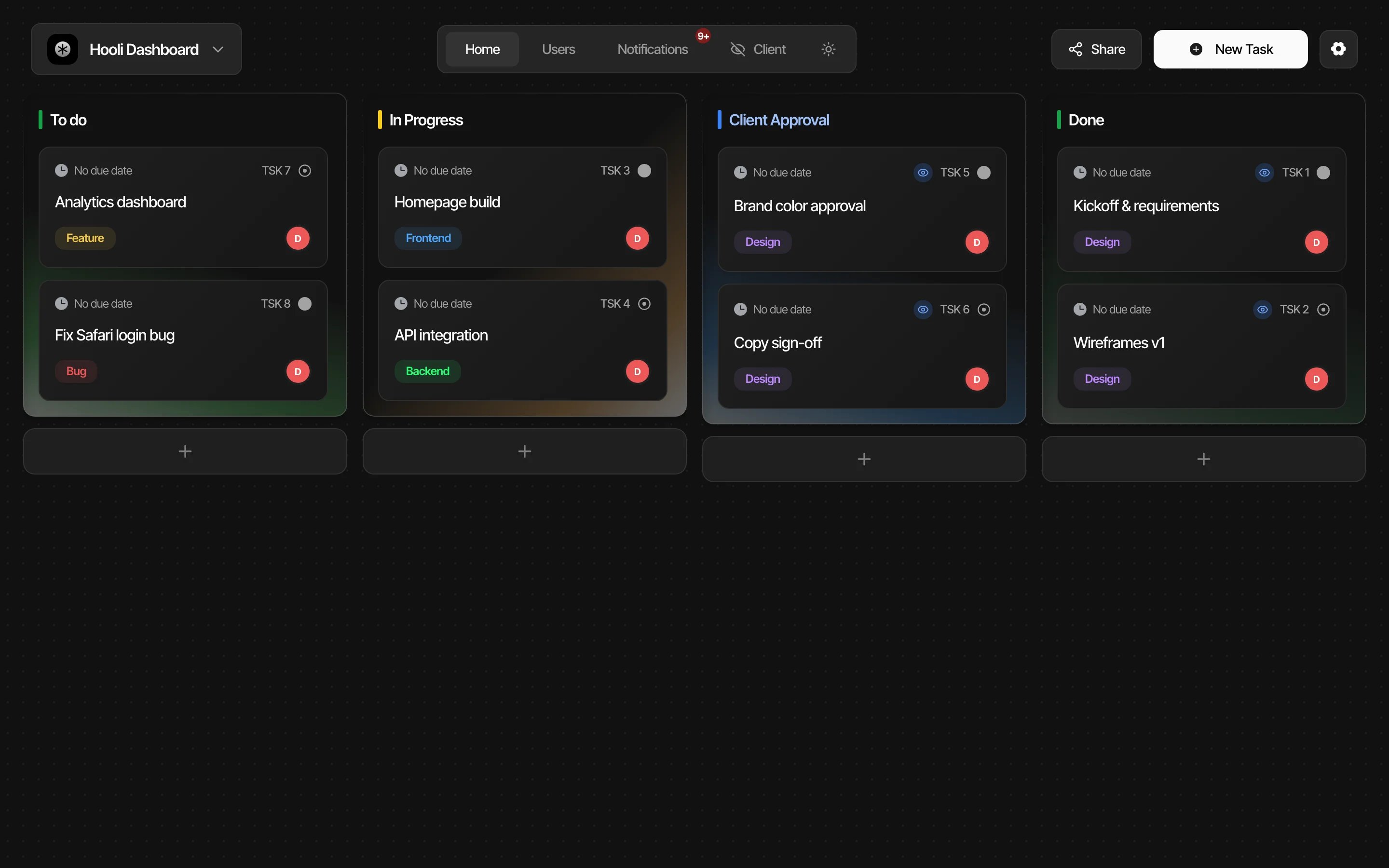
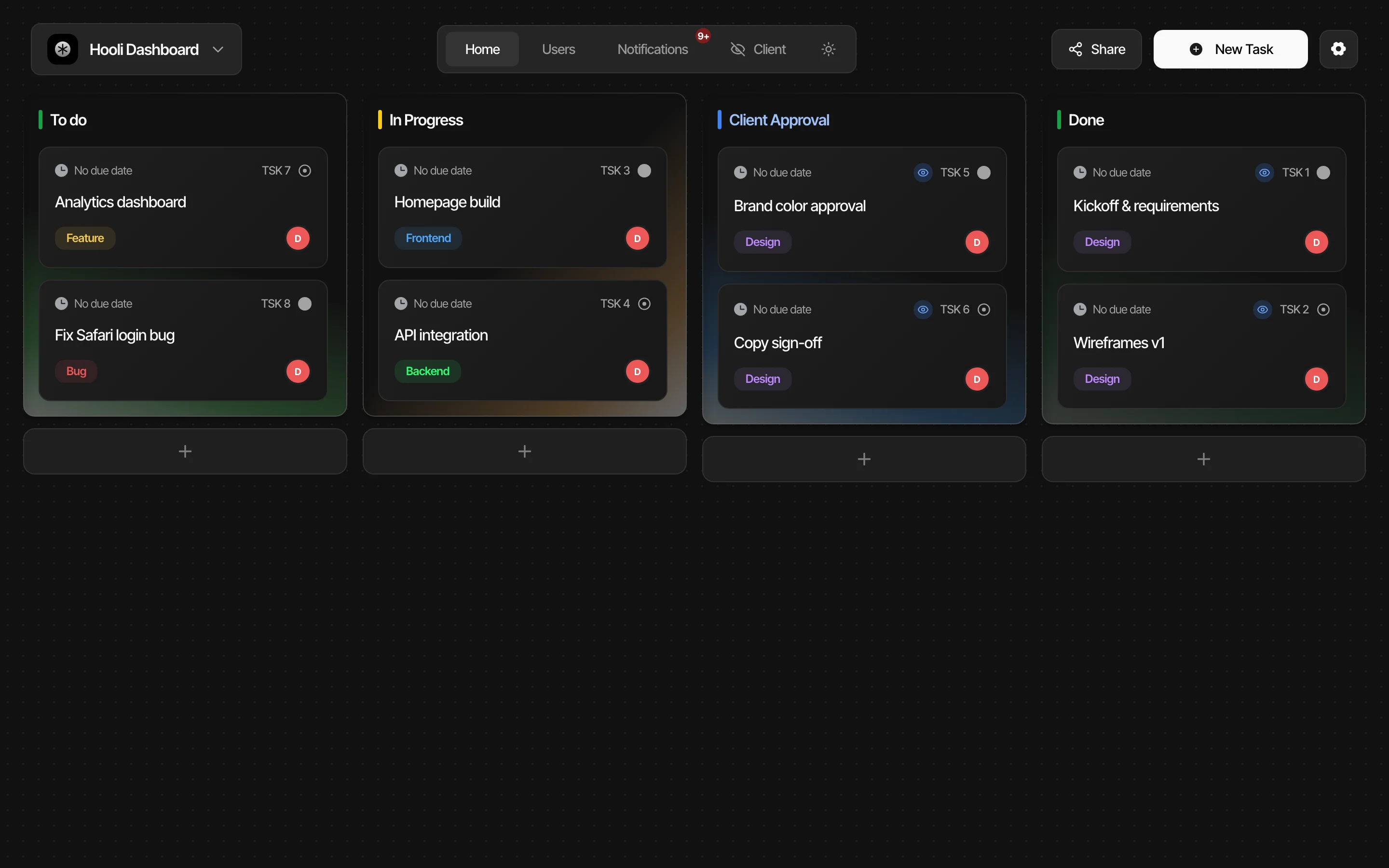
Kanban board
Four-column drag-and-drop task board with smooth animations
Dual-view client portal
Clients see only approval-ready work while teams see everything
PIN-protected access
Secure invite links with four-digit PINs per client project
Command palette
Cmd+K shortcut to create tasks, search, and navigate instantly
Light and dark themes
Frosted-glass styling with instant theme switching for branding
Real-time notifications
Instant updates on task moves, approvals, and team changes
Rich text descriptions
Formatted notes with inline images and auto-upload in tasks
Project switcher
Manage multiple client engagements from a single workspace
Task assignment and priorities
Assign members, set due dates, and tag tasks for accountability
Completed work history
Client-facing drawer of finished deliverables replaces status reports
Features & Capabilities
Production-ready features built with modern tech stack for exceptional performance and user experience
About this template
This template gives you a project management system with built-in client portals, and you don't need development experience to make it work. Your team sees the full picture. Your clients see only what's ready for their review.
The technical parts are already handled. Drag-and-drop task management, real-time notifications, light and dark themes, PIN-protected client access, all done. You can focus on organizing your work and keeping clients in the loop.
Nine screens come ready to go: authentication with email and Google sign-in, onboarding for your workspace name and logo, a four-column Kanban board (To Do, In Progress, Client Approval, Done), a filtered client board showing only approval and completed tasks, a command palette for quick actions, task detail dialogs with rich text editing, a history drawer for completed work, project settings with member management, and a share-project flow with PIN-protected invite links.
Instead of paying monthly for a project management tool that forces you into someone else's workflow, you get a system you fully control, a client portal that keeps approvals organized, and zero per-seat fees as your team grows.
| This Template | Typical Paid Tools | |
|---|---|---|
| Cost | Free to start | $20–100/month |
| Setup time | Hours | Days to weeks |
| Customization | Full control | Limited to plan tier |
| Lock-in | None, you own the code | Subscription required |
Who This Is For
- Agency professionals who lose pitches because their project delivery looks disorganized. This gives clients a polished approval portal from day one.
- Freelancers juggling client updates across email, chat, and spreadsheets. One board replaces all of it with clear status columns.
- Small business owners spending hours on admin instead of billable work. The Kanban workflow turns project chaos into a repeatable process.
- Consultants whose clients keep asking "what's the status?" because they lack visibility. The client view answers that question without a single email.
- Service teams that need internal task tracking and client-facing transparency in the same tool, without paying for two separate platforms.
Best Use Cases
Client Approval Workflows
Move deliverables into the Client Approval column and your client sees them instantly on their own filtered board, where they click "Approve Task" to move it to Done. No email chains, no lost feedback threads. Agencies that run approval workflows through dedicated systems report faster turnaround because nothing gets buried in an inbox.
Freelance Project Delivery
Track every task from To Do through Done across multiple client projects, each with its own board. The project switcher keeps contexts separated, and PIN-protected invite links let each client see only their work. That professional presentation helps justify premium rates, because clients can see exactly where their budget goes.
Internal Team Coordination
Use the full four-column board for your internal team while clients only see the two columns that matter to them. Assign tasks to team members, set priorities and due dates, tag work by category, and use the command palette to search or create tasks without leaving the keyboard. The dual-view design means one board serves two audiences.
Service Business Operations
Manage ongoing client engagements where multiple deliverables need tracking, review, and sign-off. The history drawer gives clients a record of completed work, which saves you from compiling status reports manually. Service businesses reclaim hours each week when clients can self-serve their project updates instead of requesting them.
See yourself in one of these? Remix this template and start building.
What You Can Build
This template gives you the foundation for:
- A client-facing project portal where customers review and approve deliverables without accessing your internal workflow
- A multi-project Kanban system that replaces your spreadsheet tracker with drag-and-drop task management, real-time notifications, and role-based access
- A branded workspace with your logo, custom theming (light or dark), and PIN-protected invite links that look professional when you share them with clients
Getting Started
Step 1: Remix This Template
Click "Remix" to create your copy. You'll have a complete client-ready project management system with authentication, onboarding, a four-column Kanban board, a client-specific board view, task detail dialogs, a command palette, real-time notifications, and project sharing built in. All the pages and features are already working. You just need to make it yours.
If this template isn't the right fit, you can remix a different one, no wasted work.
Step 2: Customize Your Brand
Change colors to match your brand identity. The template ships with a frosted-glass visual style, a clean single-font design system, and full light and dark themes, all controlled through CSS variables you can adjust. Lovable's visual editor lets you modify layouts and see changes instantly as you work. You don't need to know code to make it look exactly how you want. Upload your workspace logo during onboarding and set a project-specific cover icon for each client engagement.
Step 3: Add Your Content
Replace the demo projects and tasks with your actual client work. Create your project columns, add tasks with priorities, due dates, and assignees, then write descriptions using the built-in rich text editor. Upload images directly into task descriptions. The template stays out of your way so your workflow is what clients notice, not the tool.
Step 4: Connect Your Tools
Set up Google sign-in for your team, configure Supabase for your database and file storage, and turn on real-time notifications so everyone stays updated automatically. Lovable has built-in integrations for the backend services project management tools actually need.
Step 5: Go Live
Deploy your project management system with one click. Lovable handles the hosting, security, and performance optimization automatically. Your workspace goes live worldwide in minutes, and you can start sharing PIN-protected invite links with clients right away.
Conclusion
This project management template works for agencies, freelancers, and service businesses who want to run client work through a system they actually control. You get a professional Kanban board without paying per-seat fees, a client portal without building one from scratch, and real-time collaboration without stitching together separate tools.
Whether you're replacing a spreadsheet-and-email workflow or moving off a paid project management tool that charges too much for too little flexibility, this template gives you a solid foundation. The dual-view board keeps internal work separate from client-facing approvals, drag-and-drop reordering works on desktop and mobile, and PIN-protected sharing means clients get access in seconds. The template is free and takes a few hours to customize. You could have your first client portal live by tonight.